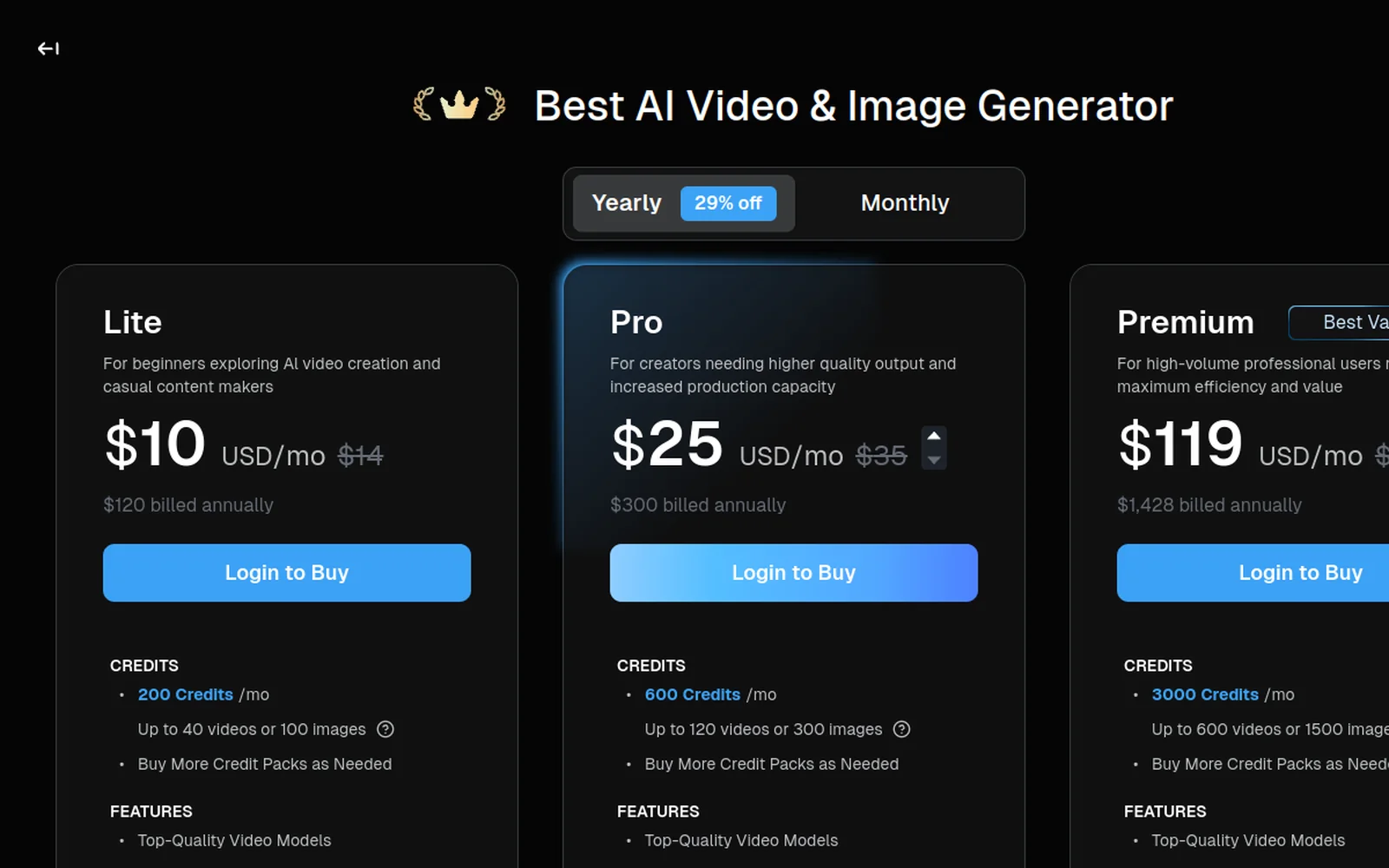
Deevid AI’s pricing page shows three tiers and a free-tier credit drop. What the pricing page doesn’t show is the math that actually matters, cost per video, cost per model, and how Deevid compares to paying each bundled model directly.
This piece does that math. Honestly, without affiliate cheerleading.
The three plans at a glance
Waiting for a sale? Deevid has not announced a Black Friday 2026 offer yet. Our Black Friday watch tracks it and shows the best verified price today.
| Plan | Monthly | Annual | Credits/mo | Videos/mo | Output |
|---|---|---|---|---|---|
| Free | $0 | n/a | 20 (one-time) | ~4 | 720p, watermarked |
| Lite | $10 | $10 (29% off) | 200 | ~40 | 720p, watermark-free |
| Pro | $25 | $25 (29% off) | 600 | ~120 | 1080p, watermark-free |
| Premium | $119 | $119 (29% off) | 3,000 | ~600 | 1080p, watermark-free |
All paid tiers include:
- Full commercial-use license
- 14+ frontier video models (Sora 2, Veo 3.1, Kling, Runway, Pika, Haiper…)
- Character consistency across multi-shot work
- Native apps for web, Windows, Mac, iOS, Android
Pro and Premium additionally include:
- Bundled AI music generation
- Bundled AI voice generation
- Bundled AI image generation
How credits actually work
Every generation burns credits. The math is consistent across all paid tiers:
- Standard-quality video clip ≈ 5 credits (most common cost)
- Longer/higher-complexity clip can cost 6-8 credits (Sora 2 at max length, Veo 3.1 cinematic mode)
- Image-to-video follows the same economics as text-to-video
- Three-variant generation (recommended for real projects) costs 15 credits per “winner”
Credits reset at the start of each billing cycle and do not roll over. Unused credits expire. This matters if you’re on Pro or Premium and skip a heavy-usage month, you lose the allocation.
Top-up credit packs are available separately and do not expire, which is useful for creators with burst usage patterns.
Start with 20 free credits No credit card required. Test the credit economics on your own work before committing to a tier.
Per-video cost at each tier
Strip out the marketing framing and look at per-clip economics:
| Tier | Cost per video (standard quality) | Cost per iteration (3-variant) |
|---|---|---|
| Free | $0 (limited to 4 total) | $0 (limited to 1 winner) |
| Lite | $0.25 | $0.75 |
| Pro | $0.21 | $0.63 |
| Premium | $0.20 | $0.60 |
Insight: the per-video cost barely drops as you move up tiers. What changes is the monthly ceiling: Lite caps at 40 videos, Pro at 120, Premium at 600. You don’t upgrade to Premium for cheaper clips. You upgrade because you need the volume.
Practical implication: if you’re producing under 40 videos/month, Lite is the correct tier at the correct price. Upgrading to Pro is about 1080p output and the bundled music/voice/image generation, not about cheaper per-clip costs.
The bundle-vs-direct math
Here’s the comparison that actually matters for anyone considering Deevid. If you paid each bundled model directly, what would it cost?
| Tool (direct) | Starting monthly | Credits/month | Notes |
|---|---|---|---|
| Kling (Standard) | $6.99 | 660 | Single model |
| Pika (Standard) | $8 | 700 | Single model |
| Runway (Standard) | $12 | 625 | Bundle: Gen-4 + Veo + Kling + FLUX |
| Sora direct | $20+ | model-dependent | Single model |
| Luma Plus | $30 | 3,200 | Smaller bundle |
If you’d otherwise subscribe to Kling ($7) + Runway ($12) + Luma ($30), that’s $49/mo for three ecosystems. Deevid Pro at $25/mo gives you all three plus Sora 2, Pika, Haiper, and more.
Breakeven: as soon as you’d use 2 or more models regularly, the Deevid bundle beats direct subscriptions on pure math. Under 2 models, direct usually wins.
Want the full standalone numbers on the models Deevid bundles? We broke each one down: Sora 2 pricing ($20-$200/mo on OpenAI), Google Veo pricing (up to $200/mo on Google AI Ultra), and Midjourney pricing ($10,$120/mo for images). Add even two of those up and the $25 Deevid bundle is already cheaper.
Prefer to watch? Here’s Deevid AI’s official product walkthrough:
Annual vs monthly billing
Annual billing discounts are ~29% across all tiers.
- Lite: $10/mo monthly or ~$84/yr annual ($7/mo equivalent)
- Pro: $25/mo monthly or ~$213/yr annual ($17.75/mo equivalent)
- Premium: $119/mo monthly or ~$1,014/yr annual ($84.50/mo equivalent)
The annual discount is genuinely meaningful if you know you’ll use the tool for 12 months. Given Deevid’s no-refund policy, though, I’d only recommend annual billing after you’ve used monthly for at least two months and confirmed the tool fits your workflow.
Hidden costs most reviews miss
1. Credits don’t roll over
Your $25 Pro allocation gives 600 credits this month. If you use 300, the other 300 are gone at renewal. For intermittent creators, this is a real cost, effectively you’re paying $25 for the 300 you used, or $0.083 per credit vs the headline $0.042.
Workaround: time your subscription to match your production rhythm. If you have slow weeks, consider dropping to Lite temporarily and buying top-up packs (which don’t expire) for burst usage.
2. Three-variant habit doubles effective cost
Every pro workflow generates 3 variants per prompt and picks the best. Your 600-credit Pro allocation then produces ~40 finished shots, not 120 generations. Once you factor this in, Pro’s effective budget is closer to Lite’s nominal budget.
This isn’t a Deevid-specific issue, it’s how generative AI works, but it’s not disclosed anywhere on the pricing page.
3. Post-production tools aren’t included
Deevid generates raw clips. For most workflows you’ll add two more subscriptions:
Real creator stack total: $25 (Deevid Pro) + $20 (captions) + $20 (editor) = $65/mo. Know this going in.
Round out the stack Submagic handles captions, Filmora handles the timeline. Both ship free tiers to test.
Which tier is right for you
Here’s the honest recommendation by profile, built from 30+ creator conversations:
Free (0 credits after 20 used)
- Right for: curiosity-phase testing only. Evaluate 4 generations, then either upgrade or stop.
- Wrong for: anything requiring watermark-free or commercial use.
Lite ($10/mo · 200 credits)
- Right for: hobbyists, occasional content creators, creators testing the waters on 40-ish videos per month.
- Wrong for: 1080p-dependent work, client deliverables over $50/project, anyone producing daily.
Pro ($25/mo · 600 credits): our default recommendation
- Right for: freelancers, small agencies, serious creator channels, anyone producing 50-120 generations/month, anyone needing music/voice/image generation alongside video.
- Wrong for: true hobbyists (Lite is enough) or high-volume agencies (Premium is better value).
Premium ($119/mo · 3,000 credits)
- Right for: agencies running concurrent client work, high-volume ad testing operations, production studios running Deevid as a primary tool.
- Wrong for: anyone whose Pro allocation isn’t already saturated month after month.
What pricing doesn’t tell you
The pricing page tells you the headline cost. It doesn’t tell you:
- Whether the output quality matches your style (free-tier test reveals this).
- Whether your hit rate on prompts is high enough to make the credit budget work (learning curve, plan for 2-3 weeks of ramp).
- Whether you’ll actually use 14+ models or just one (determines if bundle vs direct is the right approach).
The right way to decide isn’t to compare pricing, it’s to run the free 20 credits through a structured 4-shot test, then pick the tier that matches the usage pattern you’ve now proven out.
Ready to test? Claim 20 free credits here, no credit card. Or read our full Deevid AI review for the hands-on experience before committing.