
“Is Deevid AI worth it” is the wrong question.
The right question is: worth it for what? Because Deevid is a specific type of tool, a bundled multi-model video generator, and it’s unambiguously worth it for some creators, a waste of money for others, and dependent-on-use-case for most.
Here’s the honest answer after 30 days of hands-on testing, across product videos, narrative shots, ads, and social content. No affiliate inflation, no cherry-picked screenshots. Yes-and-no, with the math.
The 30-second answer
Worth it if you:
- Need generated scenes (B-roll, product motion, narrative, ads), not avatar talking-head video
- Want access to multiple frontier models (Sora 2, Veo 3.1, Kling, Runway, Pika) without paying each separately
- Produce creative work where visual originality matters
- Are comfortable with a prompt-first workflow (you’ll write descriptions, pick models, iterate)
Not worth it if you:
- Need consistent legible text inside videos (current models still struggle; Deevid doesn’t fix that)
- Require professional-grade “controlled visual narrative” across long sequences (drift accumulates)
- Want one-click finished videos with auto-assembly (that’s InVideo or FlexClip territory)
- Are making talking-head training content (HeyGen or Synthesia fit better)
- Expect a refund if you change your mind (Deevid has a no-refund policy, more on this below)
Test before you commit 20 free credits on signup, no credit card. Four generations is enough to know if Deevid is the right fit for your work.

What’s genuinely good
After the initial hype wears off, three things hold up.
1. The bundle economics really do work
The single strongest argument for Deevid is a math argument. Individually subscribing to Sora 2, Veo 3.1, Kling, Runway and Pika would cost $75-$120/mo minimum. Deevid Pro at $25/mo gives you all of them, plus Haiper and 8 other models. For anyone who actually wants to compare models across shots, or hasn’t yet decided which one fits their style, the bundle is irreplaceable.
The savings are only theoretical if you’d genuinely subscribe to all five individually. If you’re a Kling-only creator, Kling direct at $6.99/mo beats Deevid. But most creators, once they start testing, end up using 3-4 models regularly. At that point the bundle pays for itself twice over.
2. Character consistency actually works
Most AI video tools in 2026 still struggle with keeping a character (or product) consistent across multiple shots. Deevid’s character consistency feature, available on every paid tier starting at Lite, works more reliably than most single-model alternatives. Not perfectly, long sequences still drift, but well enough that narrative and multi-shot product work is actually viable.
This is the feature that separates “AI video tool as a toy” from “AI video tool in my production workflow.” On testing, it’s one of the reasons Deevid lands in real workflows instead of staying in the evaluation bin.
3. Image-to-video is the sleeper unlock
Text-to-video gets the marketing attention. Image-to-video is the quieter feature that actually earns Deevid’s keep in creator workflows. Upload a still (a product photo, a location shot, a reference image) and describe the motion you want added. The model invents far less than it does from pure text prompts, so the output is dramatically more predictable.
For creators with existing photography (product shots, travel footage, brand references) image-to-video converts that library into usable motion. That’s a workflow unlock that costs you nothing extra on the subscription.
What’s genuinely not great
Now the other side.
1. Text inside videos is still broken
If your use case requires legible text overlays generated by the model (shop signs, documents, screen UIs, readable logos), Deevid will frustrate you. This isn’t a Deevid-specific limitation, every generative video model in 2026 still struggles with text rendering. But it’s worth knowing upfront because it’s the #1 cause of “this tool isn’t what I expected” disappointment on testing.
Workaround: add text overlays in post (CapCut, Premiere, Submagic for captions). Don’t rely on the model to generate them.
2. Complex-action motion still degrades
On simple or mid-complexity motion (rotating product, walking character, gentle camera move), the output is impressive. On complex actions (multiple people interacting, fast choreography, intricate object manipulation), you’ll see drift, bodies in unnatural positions, objects warping, physics glitches. Kling handles this better than most, but “professional-grade controlled narrative” across a 30-second complex scene is still out of reach as of Q1 2026.
If your work depends on complex human action, Deevid is not the right primary tool. It can still work as a B-roll or cut-away generator in a larger pipeline.
3. The no-refund policy is real
Deevid’s refund policy is explicitly no-refunds. Once you pay for a subscription, credits, or top-up packs, that money is gone. Trustpilot reviews flag this as the most consistent user complaint, we dig into whether that makes the tool risky in is Deevid AI legit & safe?.
This isn’t unique to Deevid, many AI subscription services work this way, but it matters more than usual here because variance in individual output quality means some users pay for a month and get output they can’t use. The only safe move is to thoroughly test the free 20 credits before upgrading.
Who it’s specifically for
Over 30 days of testing, a clear pattern emerged. Deevid fits these creator profiles well:
Small agencies and freelancers producing client work that needs variety (social ads, product shots, narrative B-roll). The bundle math works, the 1080p output on Pro is sufficient, and the character consistency holds up on typical client brief durations.
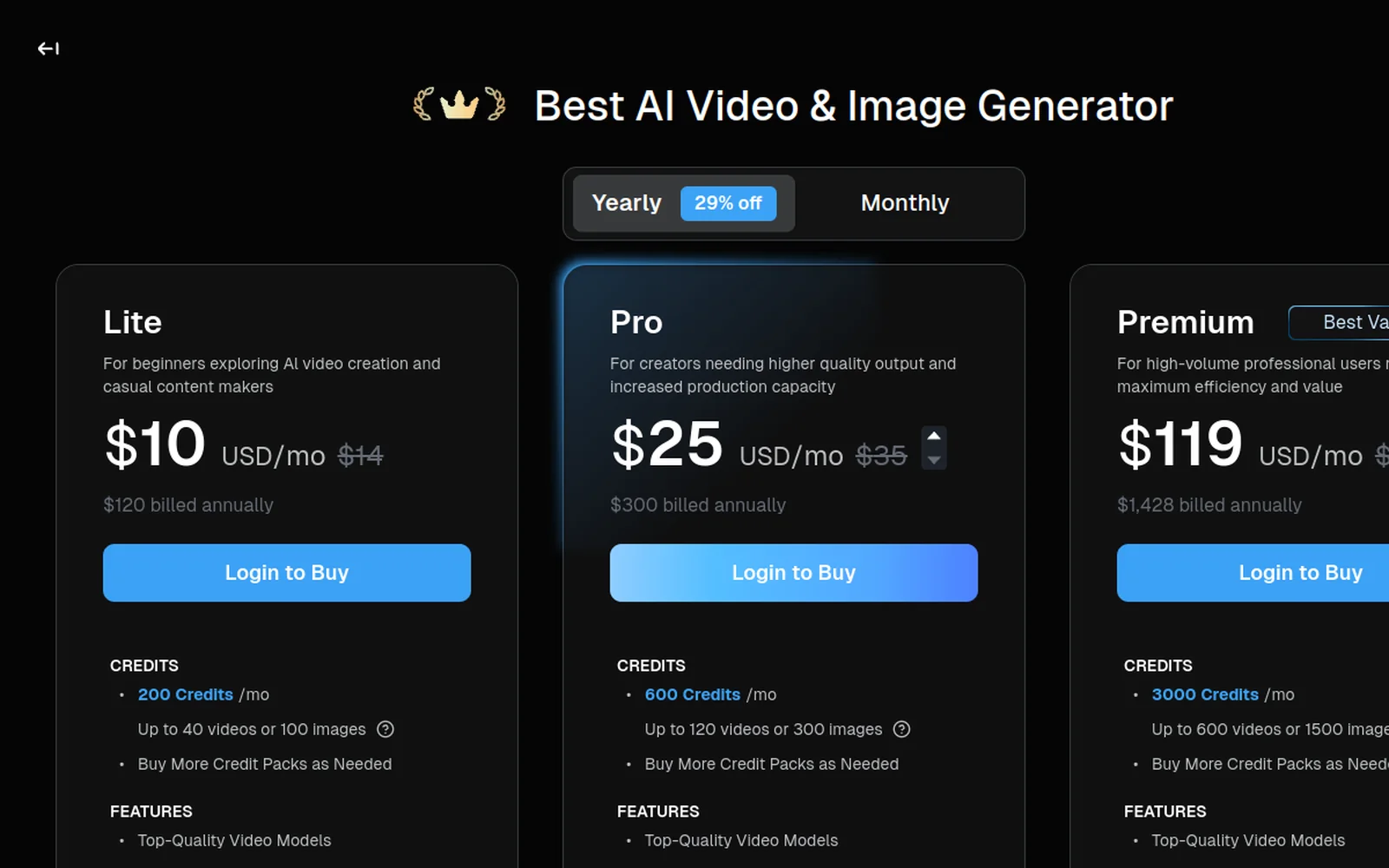
DTC marketers running creative testing on paid ads. The per-clip cost at Pro tier ($25/mo ÷ 120 generations = $0.21/clip) is cheap enough to A/B test variants without sweating the budget.
YouTubers producing voice-led content who need cinematic B-roll but don’t want to subscribe to three generation platforms. Deevid pairs well with Submagic for captions and CapCut or Premiere for timeline assembly.
Creators exploring AI video who don’t yet know which models fit their style. The bundle is the lowest-risk way to find out.
Deevid fits these profiles poorly:
Enterprise L&D teams producing compliance training at scale, Synthesia or HeyGen is the correct tool.
Performance ad buyers needing ultra-realistic UGC actors in talking-head ads, Arcads or Creatify is the correct tool.
High-volume short-form producers who need “prompt to finished video” auto-assembly. InVideo AI or FlexClip fits better.
Cinematographers working on narrative shorts where every frame is art-directed and controlled, current generative video (Deevid or otherwise) isn’t there yet in 2026. Use AI as B-roll supplement, not the primary tool.
Know your profile? Run the 20-credit test Four generations will tell you more than reading ten reviews. No credit card, no subscription trap.
The real cost math
Black Friday 2026: no Deevid offer announced yet. Read our Black Friday watch before committing to an annual plan.
Here’s the honest breakdown at each tier, accounting for credit economics.
| Tier | Monthly cost | Videos/month | Cost per video | Works well if… |
|---|---|---|---|---|
| Free | $0 (one-time 20 credits) | 4 | $0 | You’re testing |
| Lite | $10/mo | ~40 | $0.25 | Hobby / solo creator |
| Pro | $25/mo | ~120 | $0.21 | Freelance or small agency |
| Premium | $119/mo | ~600 | $0.20 | High-volume agency or production studio |
Annual billing saves ~29%. Credits don’t roll over month-to-month, if you don’t use them, you lose them.
Compared to subscribing to individual models (Sora direct, Veo direct, Kling direct, Runway direct), Deevid Pro saves $50+/mo for creators who use three or more models regularly. For creators who only ever use one model, going direct is cheaper.
Prefer to watch? Here’s Deevid AI’s official product walkthrough:
Our 30-day verdict
Deevid AI is worth it for the majority of creators working in generated video today, not because it’s the best at any single thing, but because it removes the “which subscription should I pay for this shot?” decision at a price point that’s realistic for freelancers and small teams.
It is not a professional replacement for cinematography, a fix for current AI video limitations (text, complex action), or a tool that will magically produce publishable work on day one. Like any creative tool, it rewards time in the interface and punishes users who expect one-click results.
The sensible path:
- Use the 20 free credits strategically to run four targeted tests.
- If 2 of 4 tests produce output you’d publish, upgrade to Lite at $10/mo.
- If you’re producing client work or running ads, upgrade directly to Pro at $25/mo for 1080p and the bundled music/voice/image generation.
- Don’t upgrade to Premium until you’ve actually burned through Pro’s 600 credits for three months running.
That’s the honest framework. The rest is whether your work matches Deevid’s strengths or not.
Ready to decide? Claim your 20 free credits and run the 4-shot test. Or compare Deevid against 10 alternatives if you’re still weighing options.