Short answer: the “impossible train window” trend is a short AI video format spreading on TikTok and Reels: an ordinary commuter train, a passenger looks out the window or lifts a phone to film it, and the view outside cuts to something that has no business being there: a mythological floating city, a prehistoric plain full of dinosaurs, a surreal giant eye staring back into the carriage. It’s been made with PixVerse, Kling, Seedance and Google’s Veo, among others. No single tool owns the format. The mechanic isn’t a secret model, it’s a keyframe technique: an ordinary “before” frame, a wildly different “after” frame, and the AI asked to generate a camera-consistent transition between the two. Below is how it works, which tools actually handle it, and two real generations so you can judge the output yourself.
What the trend actually looks like
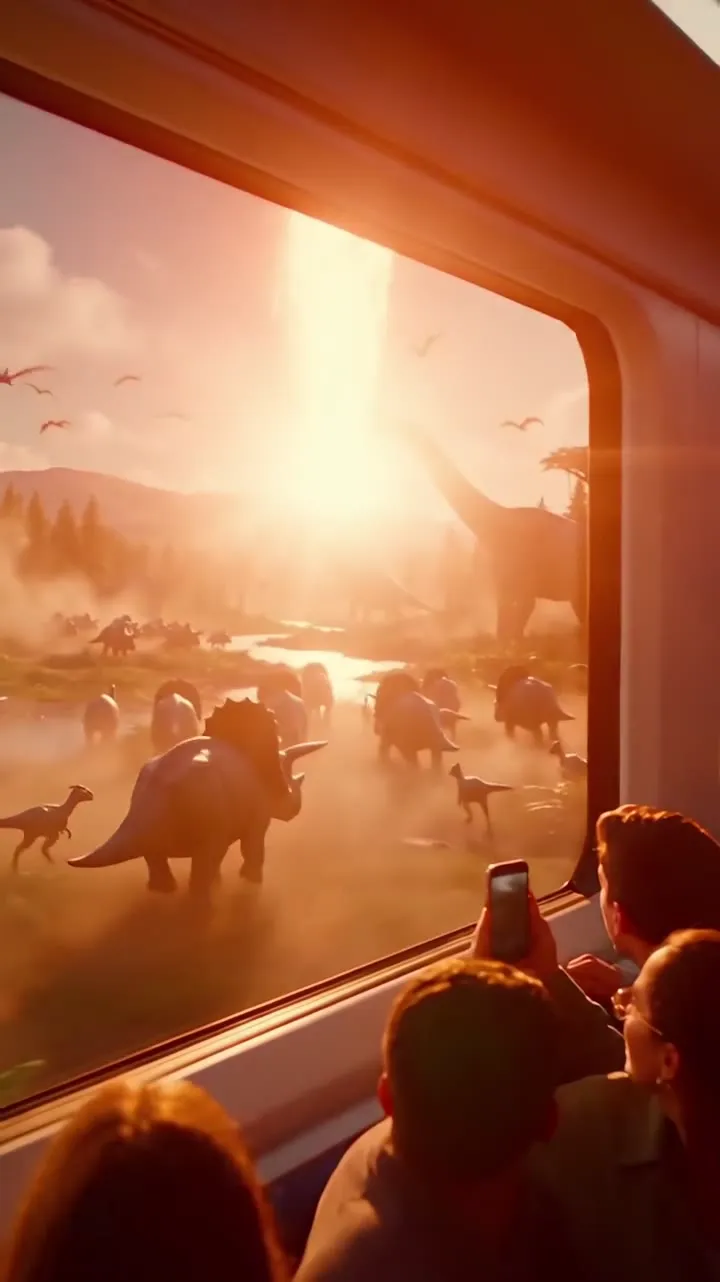
The setup is always the same three beats: an unremarkable commute (grey city, tired passengers, ordinary daylight), a beat of someone reacting or raising a phone to film, and a hard cut through the window into something that breaks the scene’s own logic. The “reveal” changes every time, and that’s the appeal. We’ve seen a mythological Mount Olympus rising out of the clouds, a sun-scorched valley thick with dinosaurs, and, in the clip below, a single human eye filling the entire window, blinking back at the train.
The format works because the payload is arbitrary. Swap in a kaiju, a space station, an underwater reef, a childhood memory: the three-beat structure (mundane, reaction, reveal) carries any twist.
Why it’s spreading this fast
A few things stack in this trend’s favor at once:
- The setting does the work for you. A commuter train is instantly relatable: no need to establish character or stakes, everyone recognizes “bored person on public transport” in half a second.
- The phone-filming beat sells the realism. Having a passenger react and raise their phone mimics exactly how a real viral clip would surface. It borrows the visual grammar of genuine bystander footage, which makes the impossible part land harder by contrast.
- It’s a template, not a one-off. Because only the “after” frame changes, creators can ship a new variant every day without reinventing the format, which is exactly what short-form platforms reward.
- The contrast is the joke. Boring commute vs. mythological/prehistoric/surreal spectacle is a complete gag in three seconds, with no punchline needed beyond the cut itself.
Which AI tools are actually behind these clips
Honest answer: several, and they’re not interchangeable in the same way.
PixVerse is the tool most commonly credited for this specific trend. It’s a dedicated generative video model (the V6/C1/R1 family) with a genuine character-consistency feature and a free daily-credit tier, which matters here: creators iterating on a new “reveal” every day burn through a lot of free generations. We cover PixVerse in detail, including pricing and where it beats a multi-model bundle, in our Deevid AI vs PixVerse comparison.
Kling is a strong fit for the “camera stays put, world flips” mechanic specifically because it’s known for coherent motion and camera behavior across a generation rather than just a static-feeling still-to-video pan. Kling’s direct subscription starts at $6.99/mo.
Seedance, ByteDance’s model, currently holds a top Elo rating on the Artificial Analysis Video Arena and generates unified audio+video in a single pass, which is useful if you want ambient train noise and the reveal’s soundscape baked in rather than added after.
Veo 3.1, Google’s model, is frequently used for the same effect too, particularly when creators want cleaner physically-plausible lighting on the “after” world. It doesn’t have a public affiliate program we can link to honestly, so we’re naming it here without a tracked link.
None of these tools invented “world behind a window changes.” What’s new is the specific commuter-train framing catching on as a shared template. The models are just capable enough now to sell the geometry and lighting consistently, which is what makes the cut believable instead of goofy.
How the effect is actually made
Strip away the spectacle and it’s a keyframe-transition technique, not a special mode hidden in any one app:
- Generate or shoot the “before” frame. A plain, ordinary train interior with a window, ideally with a person in frame for scale and realism. Flat daylight, nothing dramatic: the entire point is that it reads as boring.
- Generate the “after” frame separately. The impossible scene, composed through the same window shape and angle as the first frame. This is the part that actually takes iteration: if the window’s proportions or camera height don’t line up between the two frames, the cut reads as a bad edit instead of a single continuous shot.
- Let the model bridge the two. Most of these tools support some version of start-frame/end-frame or image-to-video generation, where you feed both keyframes and let the model interpolate a camera-consistent transition. The “cut” isn’t an edit in post. It’s the model generating the in-between motion itself.
- Add the reaction shot. A passenger noticing, reaching for their phone, or just widening their eyes does more for believability than any amount of extra spectacle in the “after” world. It’s the cheapest, highest-leverage element in the whole clip.
- Keep it short and loud on contrast. These clips run 15 to 30 seconds. Longer doesn’t help: the joke is the cut, not the world-building.
Mistakes that break the illusion
- Mismatched window geometry. If the frame, mullions, or camera angle shift between “before” and “after,” the eye catches it instantly and the illusion collapses.
- A reveal that isn’t different enough. A slightly-nicer city skyline doesn’t work. The contrast has to be total: mythology, prehistory, or straight-up surreal.
- No human anchor. Skip the reaction shot and the clip reads as a generic AI render, not “found footage of something impossible.”
- Camera movement that’s too ambitious. A static or near-static shot sells the geometry match. A sweeping camera move gives the model (and the viewer’s eye) far more room to catch inconsistencies.
If you want to test a few of these models without four subscriptions
PixVerse is the closest single-vendor match for this exact trend, and worth trying direct for its free daily credits. See the full breakdown in our Deevid AI vs PixVerse comparison. If you’d rather compare Kling, Veo 3.1 and other frontier models against PixVerse’s output style without paying for each one separately, Deevid AI bundles 14+ of them under one subscription.
Compare the models yourself Deevid AI bundles Kling, Veo 3.1, Sora 2 and 11+ other models on one subscription, useful for testing which one handles this effect best for your own footage.
FAQ
What is the AI train window trend? A short AI video format where an ordinary commuter-train scene cuts, through the window, to something impossible: a mythological city, a prehistoric plain, a surreal close-up. The mundane setup and a passenger’s phone-filming reaction sell the realism before the reveal breaks it.
What AI tool makes the train window trend? No single tool owns it. PixVerse is the most commonly credited, but Kling, Seedance and Google’s Veo 3.1 have all been used for the same effect. It’s a keyframe/transition technique available across several current-generation video models, not a hidden feature of one app.
Is this trend only about trains? The commuter-train framing is what’s currently viral, but the underlying trick (an ordinary frame, an impossible frame, and the model bridging them) works with any “window”: a car, a plane, a doorway. The train just happens to be the version that’s caught on.
How long does it take to make one of these clips? Minutes per generation once you have both keyframes, though getting the window geometry to line up between the “before” and “after” frames usually takes a few attempts. The reaction shot and reveal are typically separate short generations stitched together rather than one long continuous render.
Is PixVerse better than Deevid AI for this specific effect? For this one effect, PixVerse’s free daily credits make it cheap to iterate on repeatedly. If you want to also test Kling’s or Veo’s take on the same effect without separate subscriptions, Deevid AI’s bundle covers more ground for the same $10/mo entry price. Our full comparison breaks down both in detail.
The “impossible train window” is a good example of how fast a specific AI-video template can spread once the underlying models are consistent enough to sell it: one mundane setup, one arbitrary payload, and a cut that only works if the geometry holds. Whichever tool you pick, that geometry match, not the spectacle, is the part actually worth practicing.