Short answer: Fotor Video Agent is an AI agent that turns a prompt into an edited, captioned video: it writes a storyboard, generates the scenes and graphics, and lays everything out on a timeline you can still change. We ran three real projects of 30 to 45 seconds on October 26, 2026. The best result, a 45-second solar eclipse explainer, looks like a science documentary opener; the cheapest, a 30-second motion-graphics video in French, cost 52 credits. Every paid step shows its estimated cost first, and the real debit stayed within a few percent. Limits we hit: the voiceover and sound effects were locked on our plan, one scene came out on a bright green background that the agent could not fix, and a finished video takes about 20 minutes. Our verdict is 3.8 out of 5 for animated explainers.
Tested October 26, 2026 on an account with 3,030 credits supplied by the publisher, no paid subscription. This page may contain partner links.
Watch the test video
All three videos from this test: solar eclipse (45 s, narration added by us) · “why the sky is blue” in French (30 s, narration added by us) · Alzheimer’s explainer (40 s, music only).
Try the same prompts. The agent shows the estimated credits before every paid step, so you can stop at the storyboard for a few credits.
Fotor Video Agent review at a glance
- A finished, captioned video from one prompt. Three exports, 1920 x 1080 at 30 fps, no watermark, 30 to 45 seconds each.
- Costs are announced and they hold. About 400 credits announced for five generated clips, 415 debited. 35 to 55 announced for motion graphics, 52 debited.
- Text edits are fast. Changing one on-screen label took about a minute and did not regenerate the clip.
- Motion graphics are cheap, generated scenes are not. 52 credits for a 30-second graphics-only video against 466 to 539 for videos built from generated scenes.
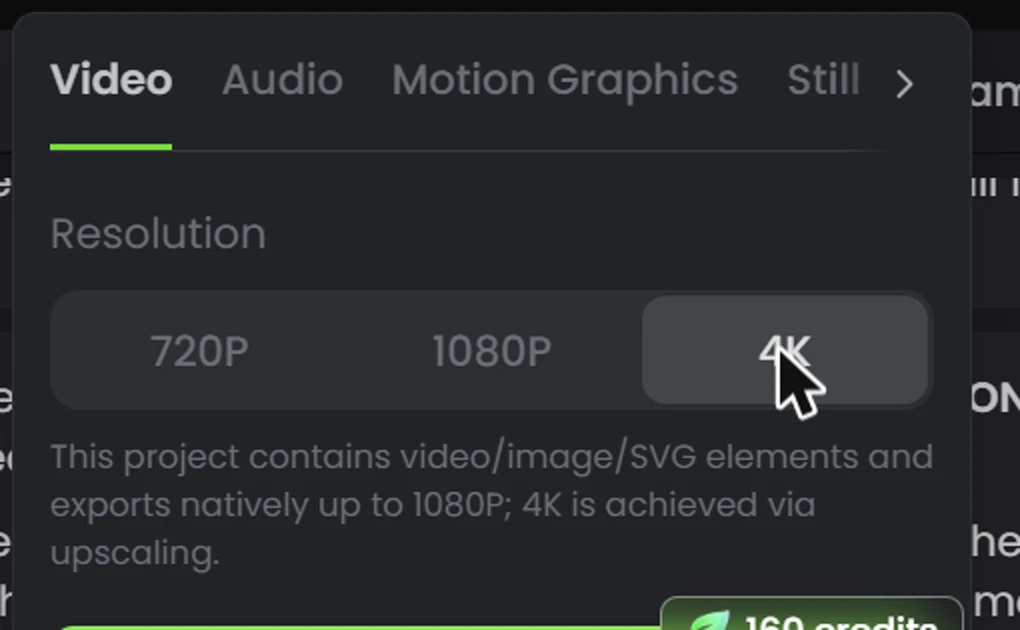
- Free 1080p export; 4K costs 160 credits and is upscaled. The export panel says the project exports natively up to 1080p.
- Locked on our plan: narration voices and sound effects. We could not judge voice quality.
- Not fully reliable: a bright green last scene that a regeneration did not fix, clipped labels and a misaligned corona ring. Review every shot.
What is Fotor Video Agent?
Fotor is an online creative suite with iOS, Android, Windows and Mac apps, long known for photo editing. The Video Agent is a chat-driven agent: you give it a brief, a script, documents or media, it proposes a storyboard, generates the pieces and assembles them on a multi-track timeline. Fotor lists eleven starting templates, including MG Explainer, Product Launch Video, AI Talking Presenter, Smart Video Montage and Long Video to Shorts.
It is not a clip generator in the Veo or Kling sense. The agent decides the shot breakdown, calls other engines (Seedance 2.0 Fast for the generated scenes in our first test, plus a graphics renderer for diagrams and text) and does the editing. You stay in control at three checkpoints: the script, the storyboard and a “Generate Video” card with its cost.
How we made these videos
Three projects, all 16:9 and 720p (the default), started from the agent page. The routine was the same each time:
- The prompt. Two prompts come from Fotor’s creator kit (cases 2 and 3), used unchanged; the third is ours, in French.
- The script. The agent writes the text of the video and asks for approval before going further.
- The storyboard. It splits the video into five shots and shows a credit estimate. We approve.
- The “Generate Video” card. For generated scenes, a more precise estimate. We noted it before confirming, then the balance afterwards.
- The assembly. The agent generates characters, clips, animated graphics and music, then edits everything: 10 to 20 minutes depending on the project.
- The export. 1080p, free. We downloaded the file and checked its resolution, duration and watermark on the file itself.
What we added ourselves: Fotor’s voice generation was locked on our plan (see below). So that you can judge the videos with sound, we recorded the script lines with OpenAI text-to-speech and aligned them to the shots with a video editor, for the eclipse video (in English, the language of the agent’s script) and the sky-blue video (in French). The voice is therefore not Fotor’s and says nothing about the quality of its voices. We changed nothing else: no frame was retouched, no shot was cut, and the green last scene of test 3 is really in the video. The Alzheimer’s video is exactly as the agent delivered it, with its music and no narration. Videos are downsized to 720p for this page.
| Project | Prompt | Length | Credits used | Time start to finish |
|---|---|---|---|---|
| Test 1: Alzheimer’s disease explainer (generated scenes plus animated labels) | Case 2 of Fotor’s creator kit, unchanged | 40 s | 466 (plus 5 for one edit) | about 20 min |
| Test 2: solar eclipse explainer (generated scenes plus animated diagrams) | Case 3 of the kit, unchanged | 45 s | 539 | about 20 min |
| Test 3: “why the sky is blue” in French (motion graphics only) | Our own prompt | 30 s | 52 (plus 8 for a failed fix) | about 10 min |
In total we spent about 1,070 of the 3,030 credits. Cases 1 (editing your own footage) and 4 (AI avatar presenter) of the kit need uploaded files, and we did not test them, so we say nothing about those two modes.
Test 1: the Alzheimer’s explainer (40 seconds)
The prompt asks for a flat vector style on an electric blue background, an elderly woman with oversized glasses, a doctor and a relative, and three animated cards with labels. The agent wrote a five-shot storyboard in about a minute and displayed “About 55 credits” for the storyboard and soundtrack. After approval it generated three character reference sheets on its own (about 30 credits), then showed a “Generate Video” card: five clips, 40 seconds, Seedance 2.0 Fast at 720p, about 400 credits. The debit was 415.
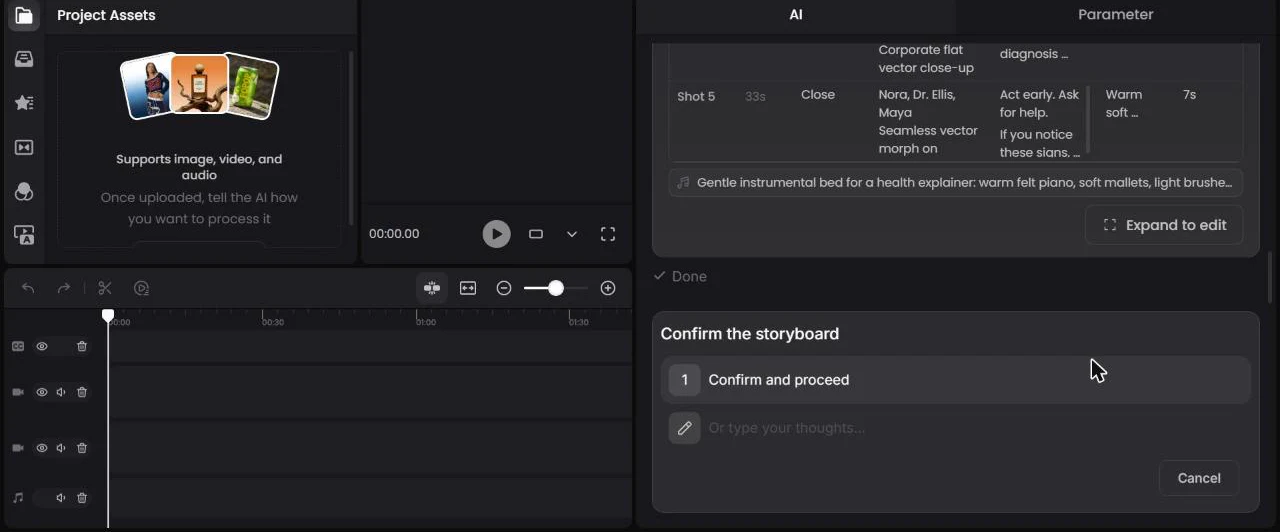
The result holds up. The three characters keep the same face, outfit and accessories from shot to shot, the labels “FORGETTING FUNCTION”, “TIME CONFUSION” and “EARLY CARE” appear as readable pills under each scene, and the transitions are clean. The exported file is exactly 40.00 seconds at 1920 x 1080.
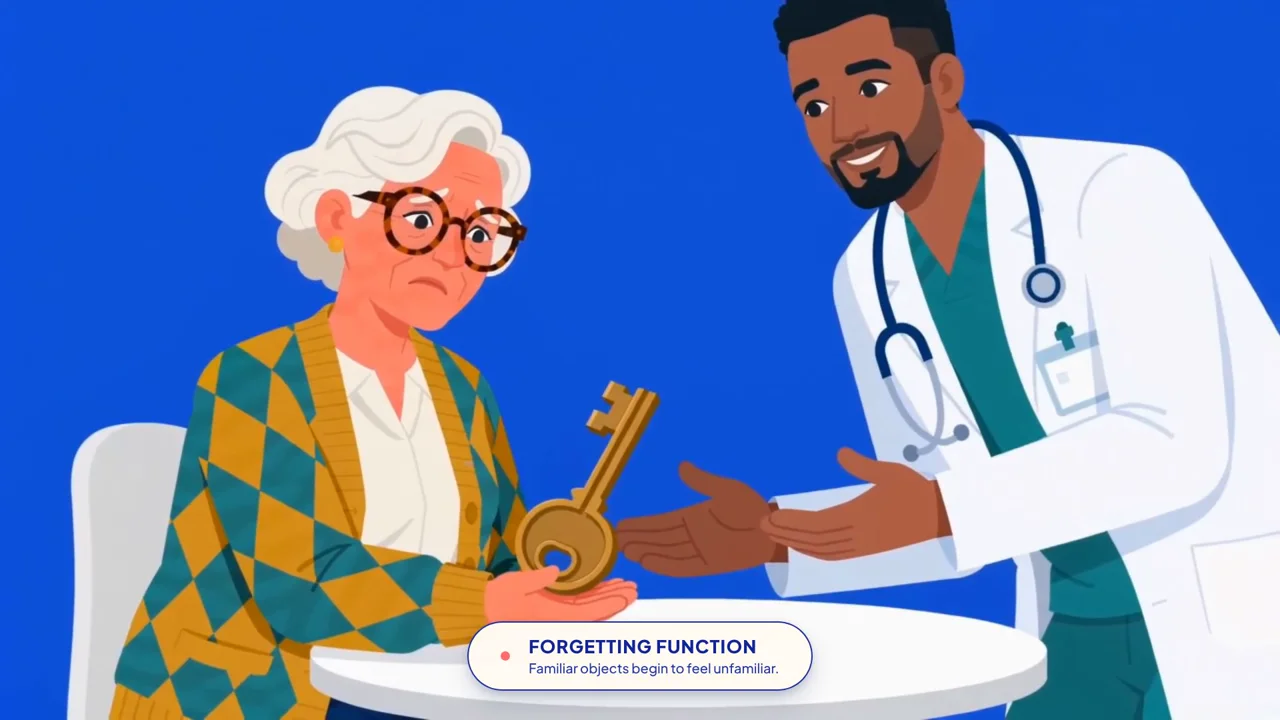
The flaws show up in the last third. In the final shot small portrait cards float for no reason, an orange cylinder appears in the middle and the bottom hands are cut by the caption pill. In the “Early care” shot, the portraits of the young and middle-aged woman do not look like the elderly woman they are meant to be. For an illustration video it is acceptable, but watch the whole thing before publishing, and never publish health content without a professional review.

Test 2: the solar eclipse explainer (45 seconds)
Watch the full video at the top of the page (narration added by us).
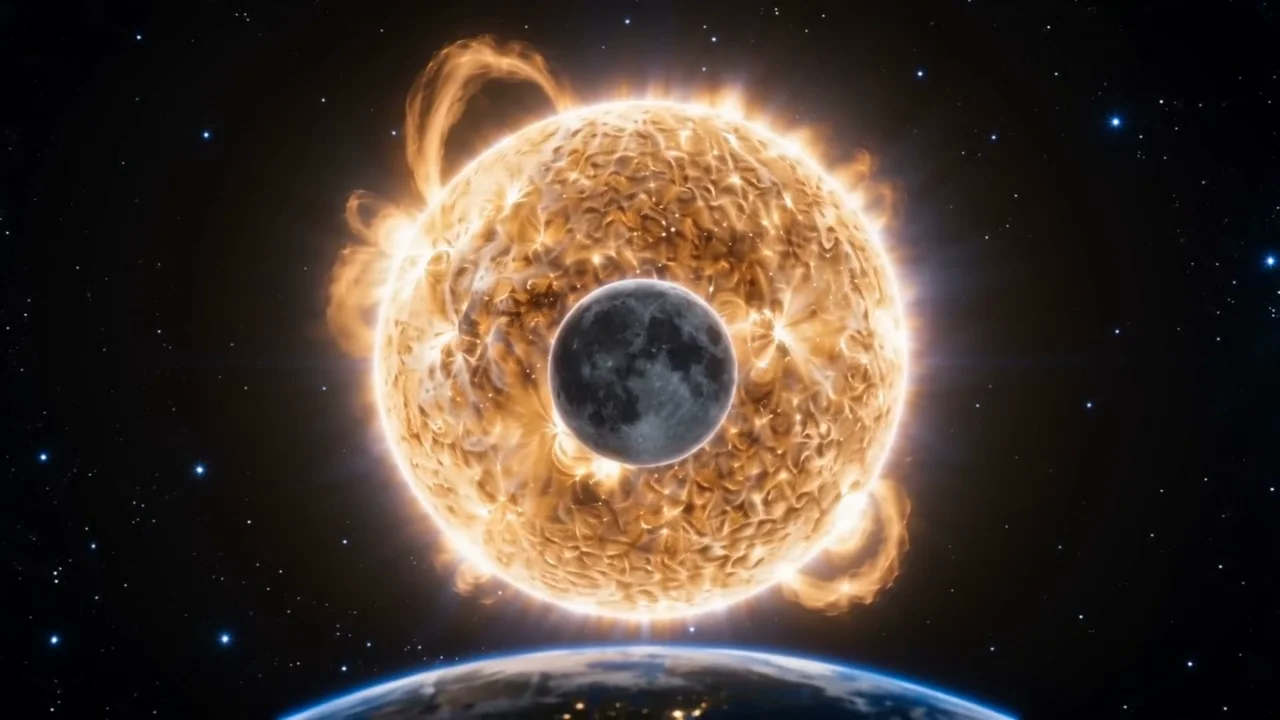
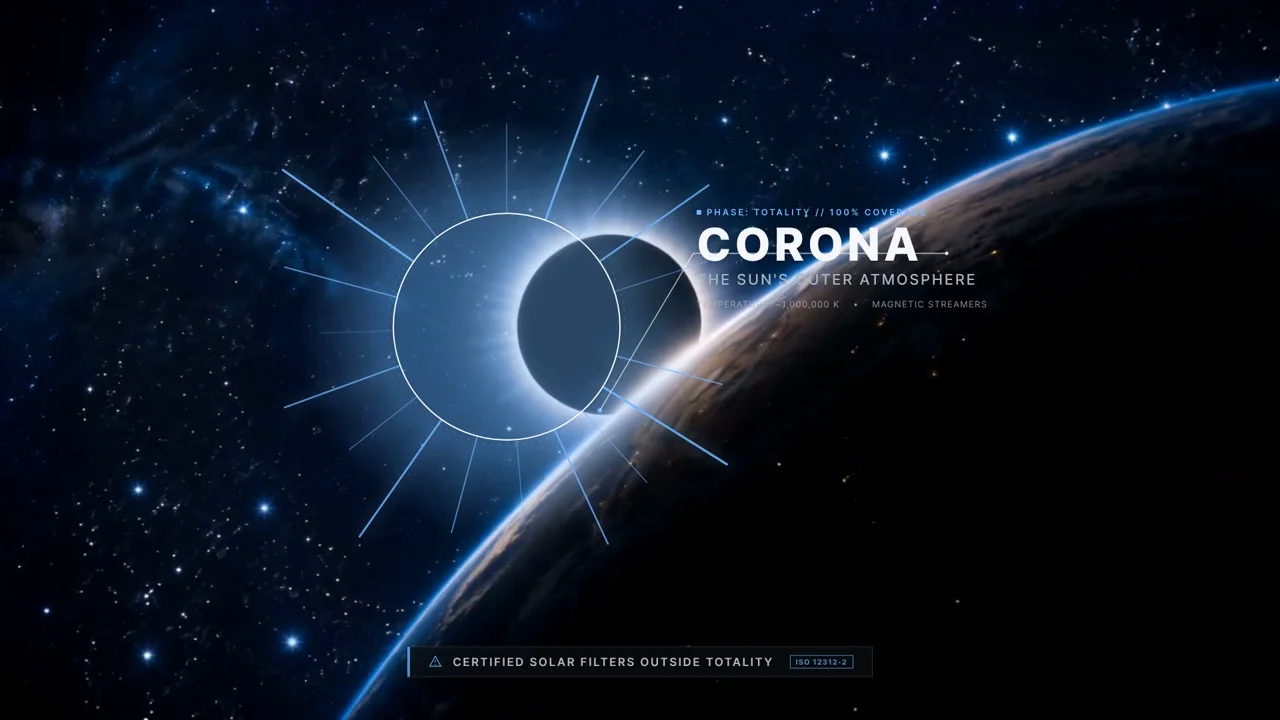
This is the most ambitious case in the kit: a science-documentary look, space shots and diagrams cut in between. The agent first wrote a nine-passage script that is accurate on the substance: the Moon’s orbit tilted about five degrees, the Sun roughly 400 times wider and 400 times farther away than the Moon, both disks about half a degree wide, and a reminder to use certified solar filters. It quoted 60 to 80 credits for the graphics and about 450 for the video (465 debited). The whole project used 539 credits.

Visually it is the strongest of the three, with Sun, Earth and Moon views worthy of a documentary opener and diagrams layered on top. It also needs a pass in the editor. The opening scene shows the Sun and the Earth at similar sizes, which contradicts a video about scale. In the last shot, the corona ring is offset from the Moon’s black disk and the temperature label is partly hidden.
Test 3: our own prompt, in French
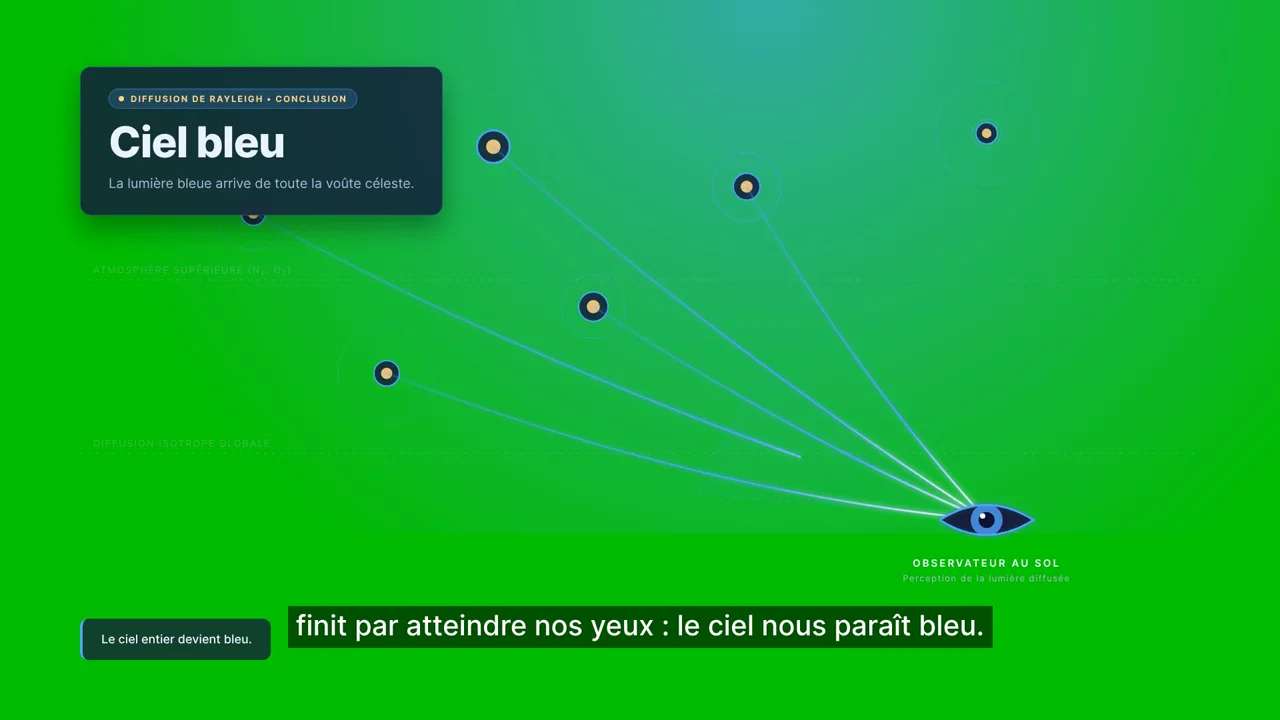
We asked for a 30-second motion-graphics video in French about why the sky is blue, with a French voiceover and subtitles. The agent answered in French and wrote a four-part script that is correct on Rayleigh scattering: white light contains every color, molecules of nitrogen and oxygen much smaller than the wavelength scatter light, shorter wavelengths scatter more, blue is scattered in all directions. The voiceover was locked on our plan (see below), so we continued with subtitles only. Announced cost: 35 to 55 credits. Debited: 52.
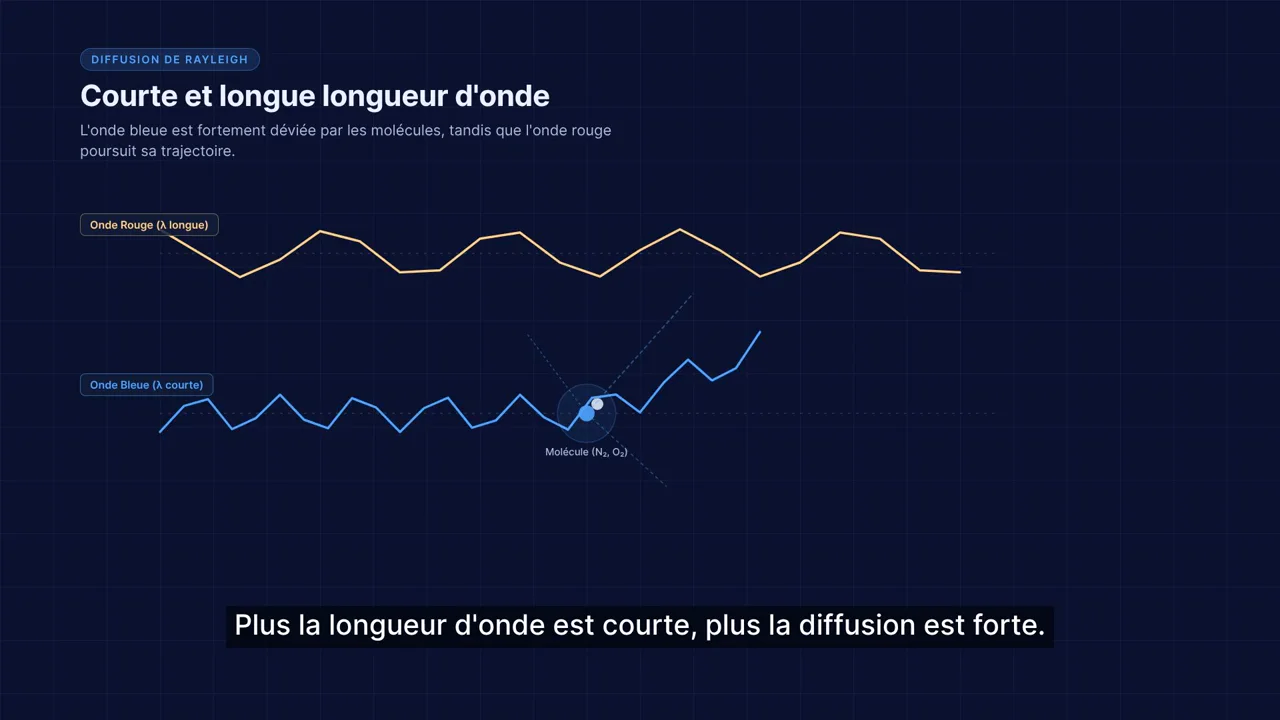
The first four scenes are good: a prism splitting a ray, labeled N₂ and O₂ molecules, the 1/λ⁴ law, subtitles with correct accents and punctuation. The small technical labels are very small on screen. The last scene, from 22 to 30 seconds, is broken: the background is a bright green instead of the planned sky blue. The agent had written that it could not extract an image to check the composition. We reported the problem; it said it could not fix the background in place and regenerated the scene (4 to 8 credits announced, 8 debited). After re-export the background was still green.
Can you edit without regenerating?
For text, yes. On the Alzheimer’s video we asked the agent to change only the label “TIME CONFUSION” to “TIME DISORIENTATION”. It did so in about a minute and announced 0 credits (the balance went from 2,564 to 2,559, so 5 credits), without touching the clip or any other shot. That matches the publisher’s promise for labels. For a flaw baked into a scene, like the green background, the agent has to regenerate the scene, and in our case the fix did not work.
How many credits does a Fotor Video Agent video cost?
| Step | Estimate shown | Debited on our account |
|---|---|---|
| Planning and storyboard (test 1) | about 55 | about 2 for planning, about 30 for three character sheets |
| 5 clips, Seedance 2.0 Fast 720p, 40 s (test 1) | about 400 | 415 |
| 5 generated scenes, 45 s (test 2) | about 450 | 465 |
| Motion graphics, 30 s, subtitles, music (test 3) | 35 to 55 | 52 |
| Editing one label | 0 | 5 |
| Regenerating one scene | 4 to 8 | 8 |
| 1080p export | free | 0 |
| 4K export | 160 | not tested |
For subscriptions, Fotor’s pricing page showed on October 26, 2026 (in euros, yearly billing, as seen from a French account): Pro at €40.99 per year (about €3.41 a month) for 100 credits per month, and Pro+ at €65.79 per year (about €5.48 a month, €7.83 struck through) for 300 credits per month. Fotor itself estimates 100 credits at “about 2 Seedance 2.0 videos” and 300 at about 8. As a yardstick, our Alzheimer’s video (466 credits on our account) equals roughly four and a half months of Pro credits or one and a half months of Pro+. Unused credits roll over while you stay subscribed, according to the same page. We did not measure consumption on a paid account, which may differ, and US prices may differ from what we saw.
Export, resolution and watermark
The 1080p export is free and the three downloaded files are 1920 x 1080, 30 fps, H.264 with AAC audio, with no watermark in the frames we extracted. The agent page talks about “4K” motion graphics, but the export panel states that the project “exports natively up to 1080P” and that 4K “is achieved via upscaling”, for 160 credits. In other words, 4K is an enlargement, not a 4K render.
Voiceover and sound effects: locked on our plan
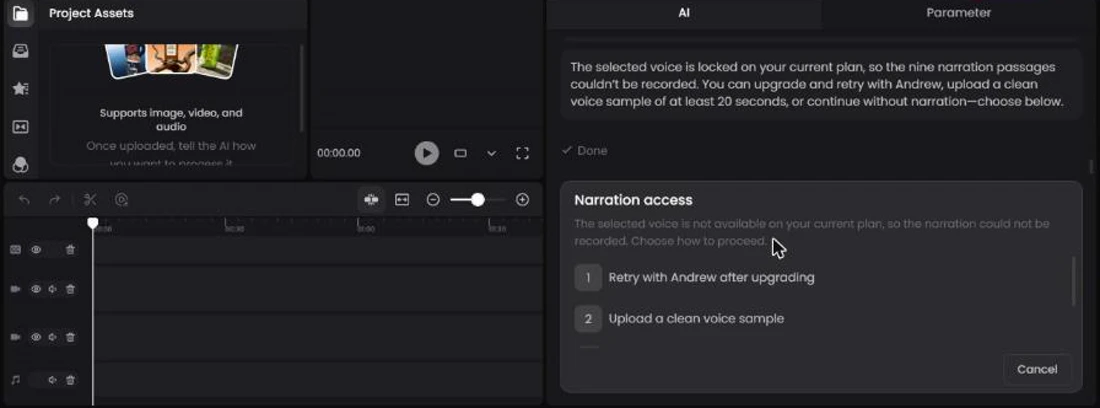
In all three projects the agent offered a list of voices (Jessica, Andrew, Michael, Frederick, Jane, Amelia, James, plus cloning your own) and then reported that the chosen voice was “locked on your current plan”, so the narration could not be recorded. Sound effects were refused for the same reason in test 1. We could not judge the voices or their French rendering. The voices you hear in the videos on this page are OpenAI’s, added by us (see “How we made these videos”). If narration matters to you, check what your plan includes before paying.
Who Fotor Video Agent is for
- Educators and explainer creators: a 30 to 45 second explainer with diagrams and subtitles, from about 50 credits for graphics only. Check every fact and every shot.
- Solo operators and small shops: a consistent look without a designer, if you accept a few iterations.
- Not ideal: if you need ready-to-use narration (not tested on our plan), shot-by-shot control, or a tight credit budget, since generated scenes are expensive.
How it compares with the tools we usually review
Comparing it with Deevid AI or Kling is not like for like. Those tools generate clips from prompts; Fotor assembles a full video and calls a video model itself for the generated scenes. Our Deevid AI vs Fotor comparison covers the older Fotor offering (a photo and design suite with short bundled clips) and predates the Video Agent. For another full pipeline we tested end to end, see our NimbleVid review, and for the wider market our AI video tools overview and pricing research.
Our verdict on Fotor Video Agent: 3.8 out of 5
For an animated explainer of 30 to 45 seconds, Fotor Video Agent delivers in about twenty minutes what would take hours to edit by hand: consistent characters, clean diagrams, correct subtitles and a free 1080p export. It announces its costs before acting and accepts text edits in a minute. It loses points on review work (a green scene that stayed green, clipped elements, a wrong scale for the Sun), on voiceover and sound effects being unavailable on our plan, and on the price of generated scenes, which eat several months of credits on a small subscription.
Our advice: start with a motion-graphics-only project (around 50 credits), check every shot before exporting, and pay for generated scenes only where they matter.
Start with a graphics-only explainer. Stop at the storyboard card to see the cost, and export in 1080p for free.
Sources and date
- Tests run on October 26, 2026 on fotor.com/agent; exports analyzed locally (resolution, duration, watermark).
- Fotor Video Agent, official page
- Fotor pricing (read October 26, 2026)
- Fotor creator kit: prompts for cases 2 and 3
FAQ
Is Fotor AI free?
Partly. Fotor's Basic plan is described as free, with 50 chats and 1 task with the AI agent. On our account, credited with 3,030 credits, 1080p export was free, but every generation used credits: 52 for a graphics-only video, more than 500 for a video of generated scenes.
How much does Fotor cost?
On October 26, 2026, the pricing page showed Pro at €40.99 per year (100 credits per month) and Pro+ at €65.79 per year (300 credits per month), billed yearly, as seen from a French account. Check the live price and the renewal terms before paying.
Is Fotor safe and legit?
It is an established company with apps on all main platforms. Search results also include user complaints about unexpected charges, on Reddit and Trustpilot, as with many subscription tools. We have not checked them one by one; read the cancellation terms before entering a card.
What resolution does Fotor Video Agent export?
1920 x 1080 natively, free. 4K exists for 160 credits but is upscaled, according to the export panel.
Does the voiceover work?
We could not test it: voice generation was locked on our plan. The agent writes and subtitles correctly in French.
Can you edit the video after it is generated?
Yes for text: changing one label took about a minute without regenerating the clip. For a scene defect, the agent regenerates the scene, and our fix did not work.
Can you use the videos commercially?
Fotor says on its pages that AI-produced elements are royalty-free for commercial campaigns, excluding uploaded personal media. Read the official terms before client work.
Is Fotor Video Agent better than Veo or Kling?
They solve different problems. Veo and Kling generate clips; Fotor assembles a finished video with graphics and subtitles and calls a video model for the generated scenes. For generators, see our AI video tools overview.
Which is better for video, Canva or Fotor?
We have not compared them on video, so we will not rule. The criterion to watch is editing: how far you can adjust a generated video without starting over.