
Short answer: Klap turns a long video into vertical shorts. We gave it a 6-minute tutorial we own, and about five minutes later it returned nine clips of 16 to 37 seconds, each with a title, a virality score out of 100 and a written reason for the score. The captions were accurate, the exports were clean 1080 x 1920 files with no watermark, and the pricing is the simplest of the clipping tools we have read: you pay per clip, not per minute of source. The part we could not judge is publishing and analytics. Verdict: a fast, clear clipper that is worth a free run on your own video.
Tested on November 8, 2026 on the Pro plan, which Klap gave us for 30 days. We paid nothing, nobody at Klap read this page before it went live, and no score or wording was promised. This page contains affiliate links (disclosure): if you subscribe through them we earn a commission.
Klap review at a glance
- Speed: about five minutes to analyze a 6-minute video and cut nine shorts. Four extra shorts requested with a prompt took about 35 seconds.
- Moment selection: the nine clips matched the real beats of our video: the price reveal, the credit breakdown, a failed request, the limits.
- Scores come with reasons: a score from 88 down to 72, and a paragraph explaining each one. We cannot tell you the scores predict views, because we did not publish the clips.
- Exports are clean: 1080 x 1920 at 30 fps, no watermark on the Pro plan, with karaoke captions and an intro title.
- Language: French in, French transcript and titles out. One click translated the captions into English.
- Pricing: $14.50 to $94.50 a month billed yearly, counted in clips. One short is one clip.
- Not tested: posting, calendar, analytics and an English-language source video.
Run one of your own videos through Klap. According to Klap, the free trial covers one video with preview and editing. Download and publishing need a paid plan, from $14.50 a month billed yearly.
What is Klap?
Klap is a web app built around one job: take a long video (a podcast, a webinar, a tutorial, a stream) and cut it into short vertical clips. Klap’s own pricing page says every plan includes AI clipping with a virality score, reframing on the active speaker, animated captions, 99+ languages, scheduling and publishing to TikTok, YouTube, Instagram, LinkedIn and Facebook, unlimited social accounts, post analytics, and an editor with b-roll and hook titles. Source videos can run up to three hours.
It does not generate video from a prompt. If you need footage first, that is a different category, and it is what Higgsfield or Deevid AI do. Klap starts after the footage exists.
How we tested Klap
We ran the test on November 8, 2026, in Chrome on Windows, on the Pro plan that Klap gave us for 30 days. We bought nothing and did not change plan. The Billing page shows no plan, because the Pro access is a gift and not a subscription.
The source is a tutorial we own: our 6-minute French video on Higgsfield, published on our YouTube channel, which we pasted into Klap as a link. It is a screen recording with a voiceover, not a talking head, and it is in French. We say this up front because this site is written in English, and because it changes what we can judge. Klap’s headline reframing feature follows an active speaker, and our video has no speaker on screen, so we could not test that part. We also did not run an English source.
We did not connect any social account. Everything below about posting, the calendar and analytics is therefore what the pages say, not what we saw work.
How fast is Klap, and what does it ask for?
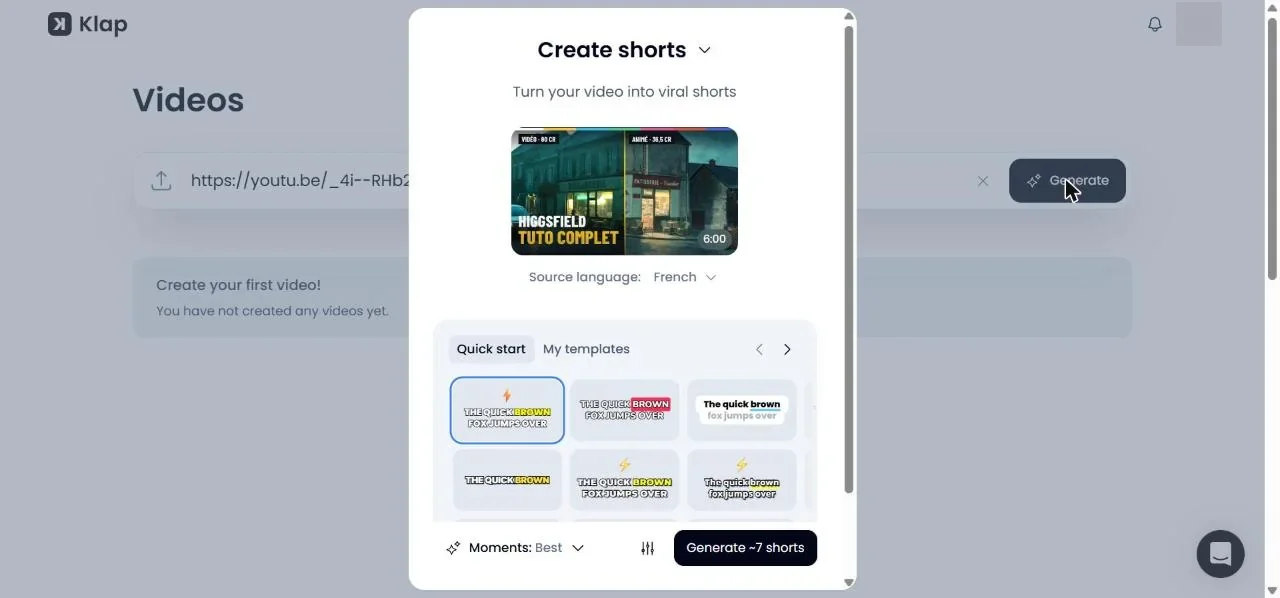
Pasting the link took about three seconds to load a preview with the title, the 6:00 length and the detected language. Before generating, the window offers a few settings: shorts length (Auto), aspect ratio (9:16, with smart reframing), captions on or off, an intro title on or off, a choice of caption templates and a “Moments” setting that was on Best.
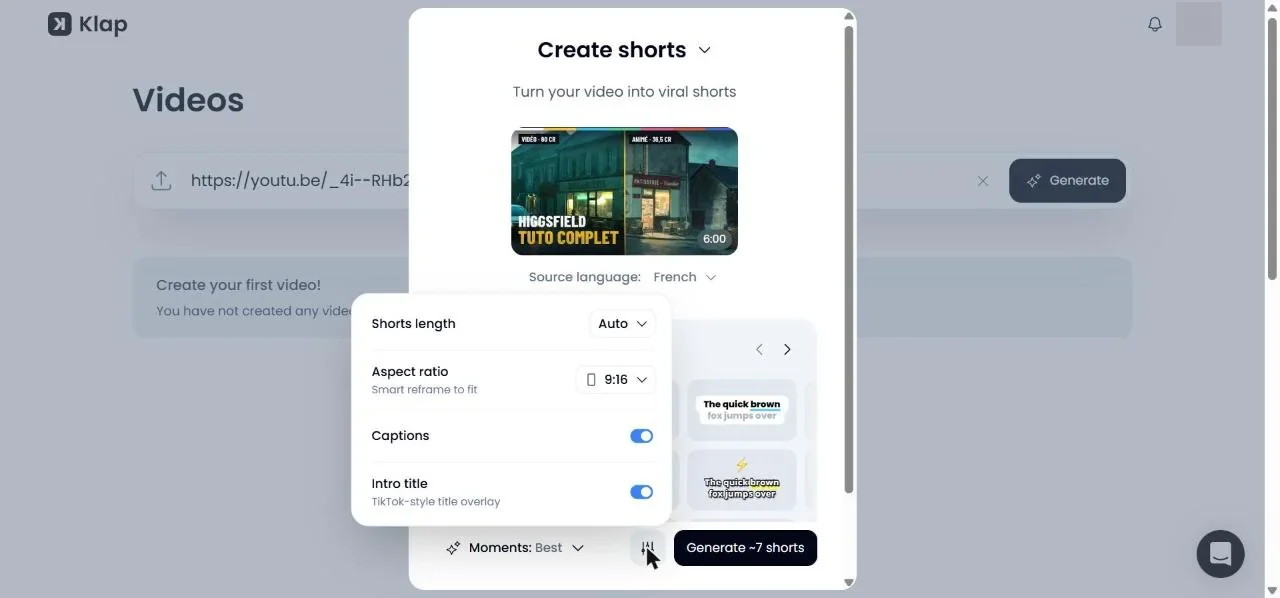
We clicked Generate at 01:29:52 by the PC clock. The page counts through preparing media, analyzing video, transcribing audio, extracting the best topics and processing captions, and it tells you that you can leave the page and get an email. It announced “6 minutes remaining” at the start, and the nine shorts were ready after about five minutes. For a 6-minute source that is close to real time, and still much faster than cutting nine clips by hand.
What did Klap pick?
Klap proposed about seven shorts and returned nine. Their lengths run from 16 to 37 seconds. Each has a title written by the AI, a rank and a score, and a paragraph that explains the score. All of it came back in French, because the video is French. We translated the titles for you.
| Rank | Title (translated) | Length | Score |
|---|---|---|---|
| 1 | A bakery generated by AI from a single tool | 0:19 | 88 |
| 2 | How much an AI video really costs | 0:20 | 84 |
| 3 | When the AI forgets a requested detail | 0:19 | 82 |
| 4 | Creating an AI image with Soul Cinema | 0:22 | 78 |
| 5 | The flaws of AI-generated images | 0:16 | 77 |
| 6 | The Genjutsu effect and the credit trap | 0:29 | 76 |
| 7 | The price of the Higgsfield Ultra subscription | 0:17 | 75 |
| 8 | Turning an AI image into a video | 0:37 | 73 |
| 9 | The limits of Higgsfield to know about | 0:18 | 72 |
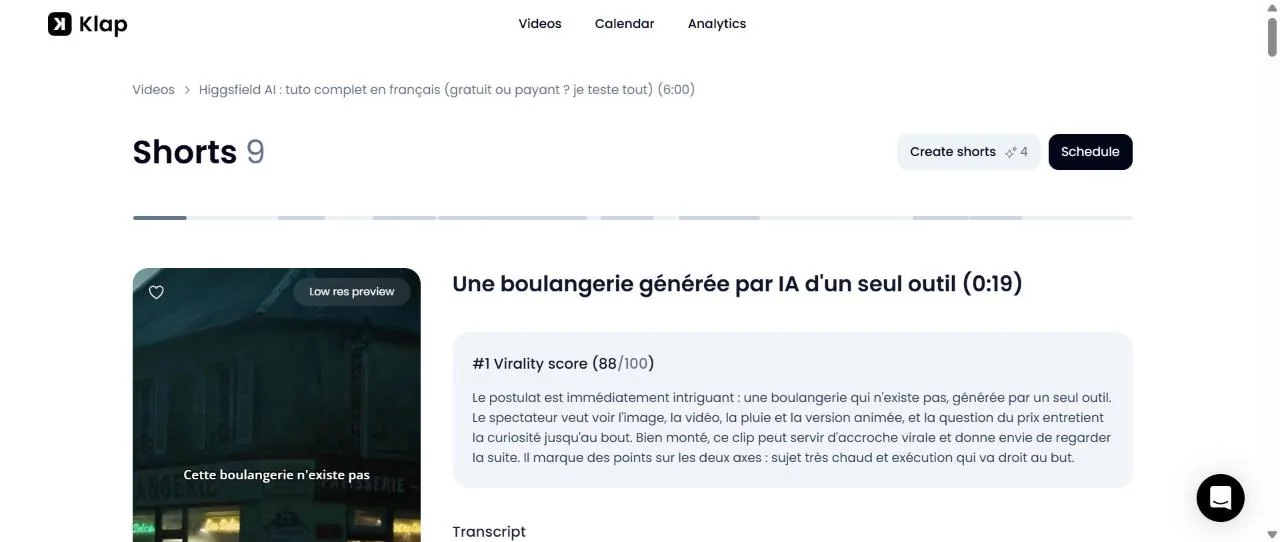
Two things stand out. First, the selection is sensible. The clips line up with the moments we ourselves would call the strong ones in this tutorial: the opening hook, the cost of one five-second video, the “I asked for a figure with an umbrella and it never appeared” failure, the Ultra plan price and the closing list of limits. The AI also understood that a number said out loud, such as “80 credits” or “220 euros a month”, is a clip.
Second, the scores. The top clip, at 88, is the first 19 seconds of our video, which we wrote as a hook, so the ranking is not absurd. But the written reasons use confident language, for example that a topic is “very hot” or likely to be saved and shared. Those are the AI’s opinion. We did not publish the clips, so we have no view counts to check a score against, and we will not tell you that 88 beats 72 in the real world. Use the score as a way to sort, then watch the clips.
What do the clips look like?
In the list, each clip plays as a low-resolution preview with the captions already burned in. The exports are the real test. We exported two clips on the Pro plan and opened the files.
- Format: 1080 x 1920 MP4, H.264, 30 frames per second, with AAC audio. The 19-second clip weighed 14 MB and the 23.6-second one 8.8 MB.
- No watermark on either file, which matches what Klap says about paid plans.
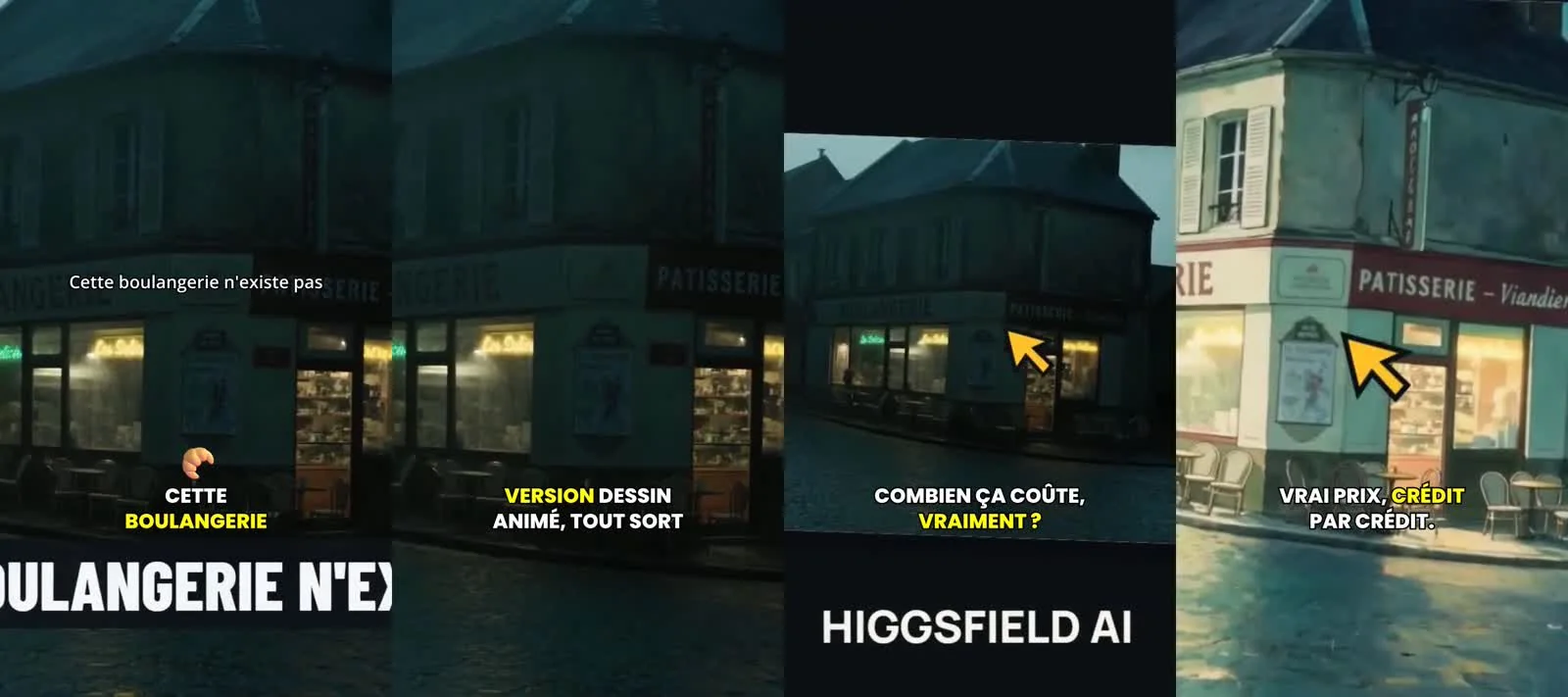
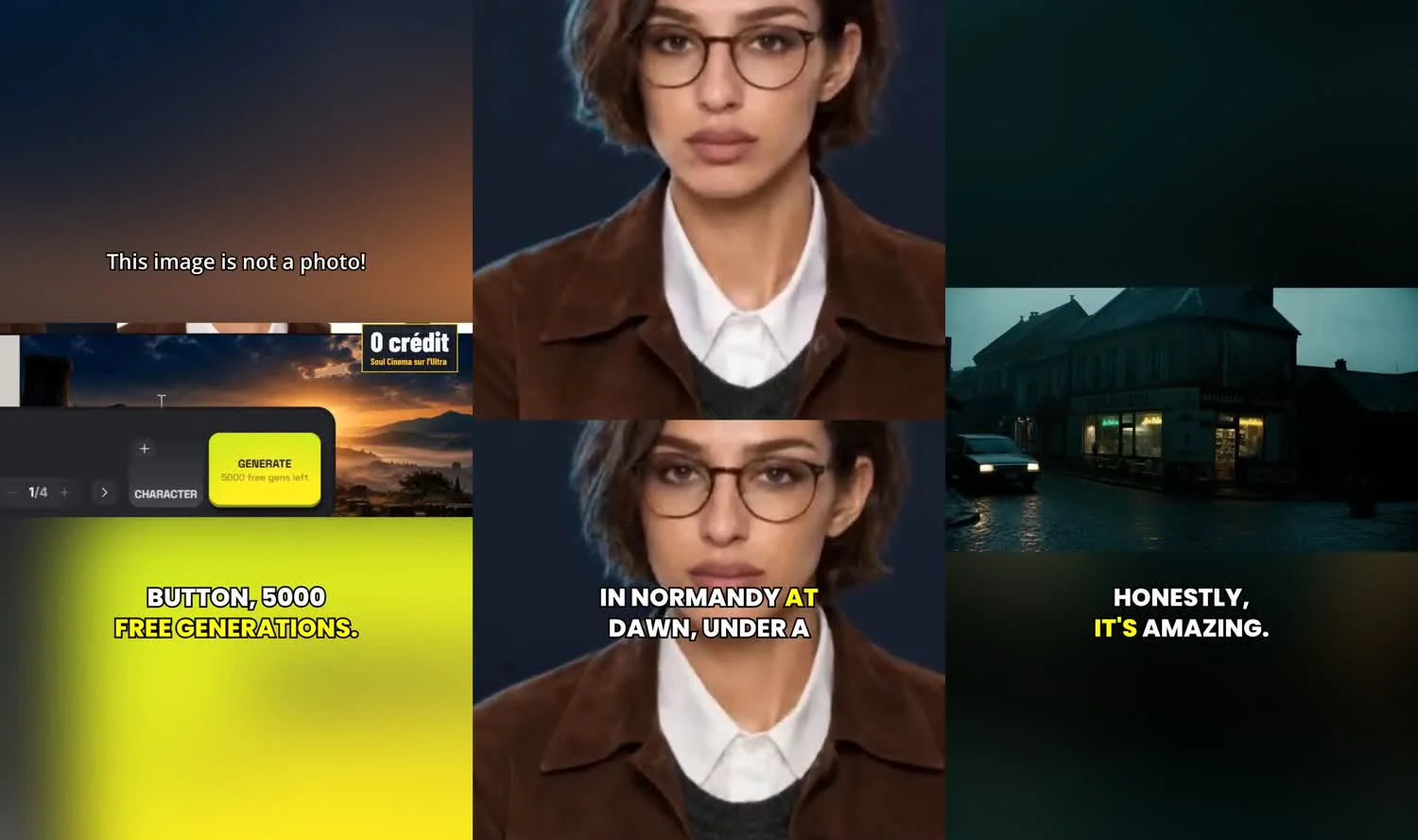
- Captions: word-by-word karaoke captions with one highlighted word at a time, an emoji on the first word and an intro title at the top (“Cette boulangerie n’existe pas” in the first clip). The transcript of the first clip matched our script word for word, and we read the other eight without spotting a wrong word.
- Reframing: on a screen recording, Klap kept the source composition in places, fitting the 16:9 recording in the middle of the vertical frame with the source’s own title card below it, and cropped tight on the scene elsewhere. On the clip about the image model it stacked two crops of the same gallery of AI portraits, with the captions between them. That is acceptable for our footage, but it is not the same as following a person, and we cannot judge that.
- Leftovers from the source: text burned into our video, such as a “0 crédit” card, is still there. Klap does not remove it.
An export took roughly two minutes for each clip. The file downloads on its own when it is done.
What can you change in the editor?
Each short opens in a full editor. The left-hand toolbar has four panels:
- Trim shows the transcript, word by word, so you cut by editing text, with a timeline of scenes below.
- Reframe offers the vertical format and shows, scene by scene, the crop box on the source frame.
- Captions has Text, Presets and Style tabs, a toggle, and a translate button.
- Elements has slots for an intro, an outro and a logo, and the intro title toggle.
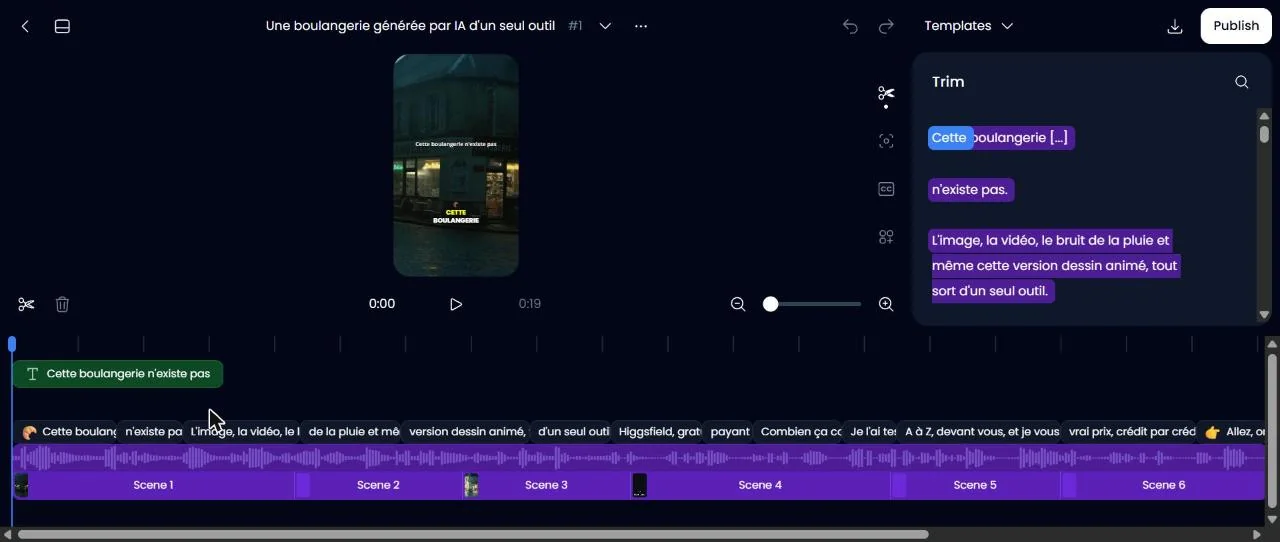
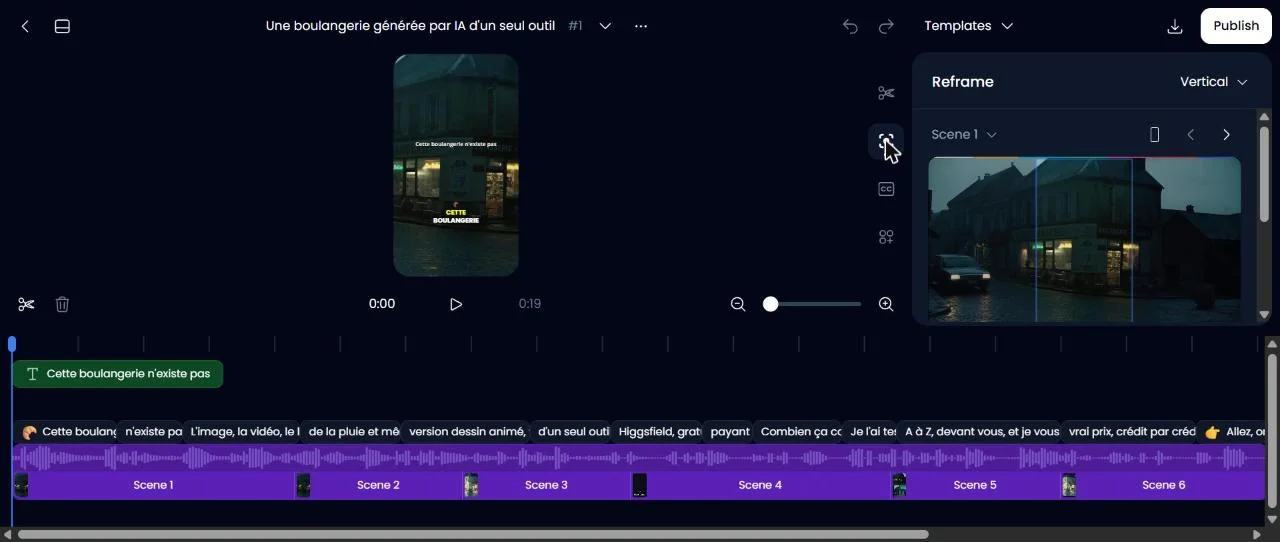
The preview took a few seconds to load the first time we opened the editor, and then it behaved normally. We did not push the editor hard: we trimmed nothing, because our goal was to see what the AI gives you without effort.
Can you ask Klap for a specific moment?
Yes. The Create shorts window has a prompt box (“Describe moments to turn into shorts”) with quick chips for funny moments, key takeaways, hot takes, best stories and surprising facts. It also showed four more suggestions that the first pass had left out, with lower scores of 52 to 69.
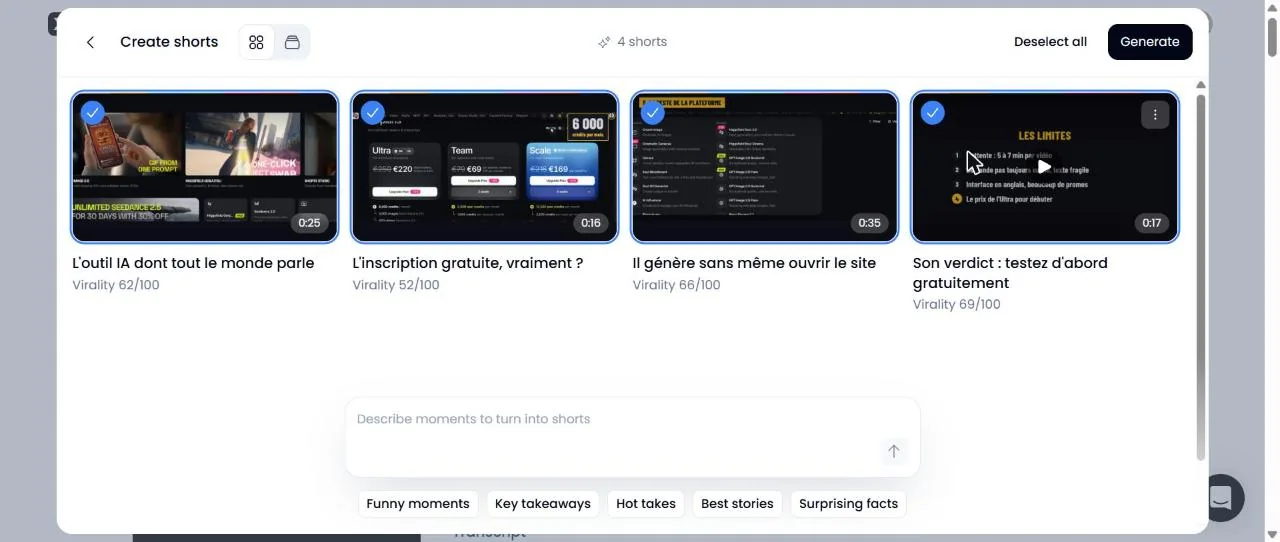
We tried two prompts. The first, written in English on our French video, asked for the moment where the real cost of one five-second video is explained. Klap answered that it could not find a moment and suggested a different range. The second, written in French, asked for the moment where the free signup and the offered credits are discussed. About 15 seconds later Klap listed four moments, and after we confirmed, the four new clips were ready in about 35 seconds, with scores from 75 to 68. The lesson is practical: write the prompt in the language of the video. We cannot say whether the English failure was the language or the fact that the cost moment already existed as a clip, so treat it as a limit, not a rule.
Can Klap translate the captions?
Yes. In the Captions panel, a translate button opens a window that says “Select from 54 languages”, with two buttons: Translate, which changes the clip in place, and Translate as new. We picked English, and about 25 seconds later the captions and the intro title were in English (“This image is not a photo!”).
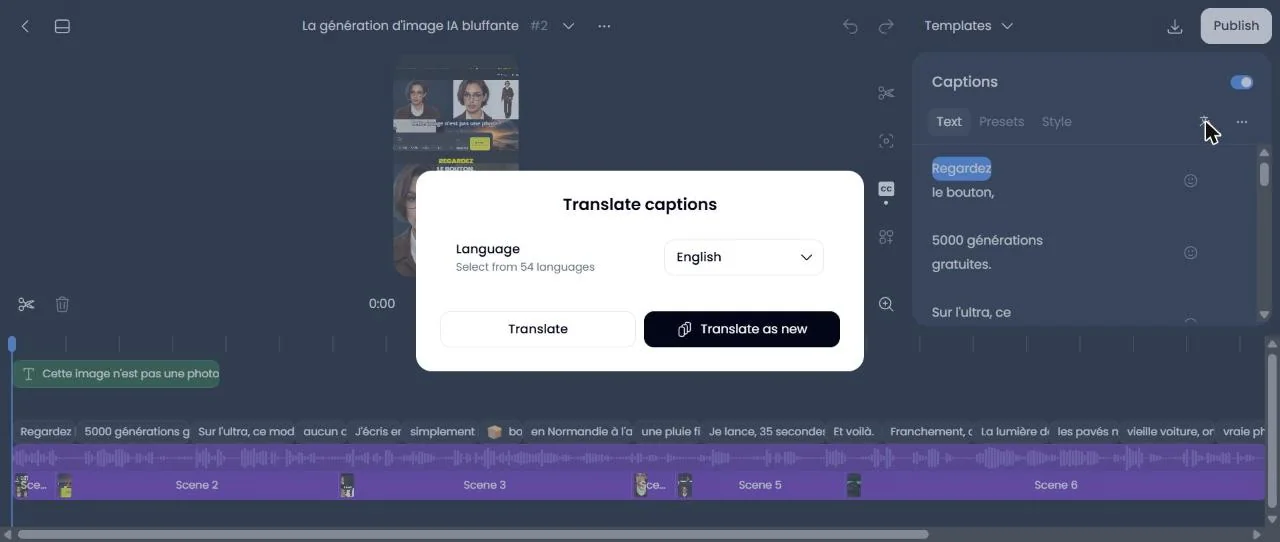
We exported that clip. The English captions are burned in, and they read well, but the voice is still French, and so is any text that was already in our footage.
How much does Klap cost?
We read the pricing page on November 8, 2026. Klap bills by clips generated, and every short it makes counts as one clip. The length of your source does not use up the plan, which is the opposite of tools that charge per minute.
| Plan | Monthly | Billed yearly | Clips per month |
|---|---|---|---|
| Basic | $29 | $14.50 a month ($174 a year) | 100 |
| Pro | $79 | $39.50 a month ($474 a year) | 300 |
| Pro+ | $189 | $94.50 a month ($1,134 a year) | 1,000 |
On yearly plans, Klap says you get the whole year of clips at once: 1,200, 3,600 or 12,000. Our arithmetic from those prices gives, per clip, about $0.15 on Basic yearly, $0.13 on Pro yearly and $0.09 on Pro+ yearly, and about $0.29, $0.26 and $0.19 when billed monthly. Our test produced 13 shorts, which at the yearly Pro rate would come to roughly $1.70.
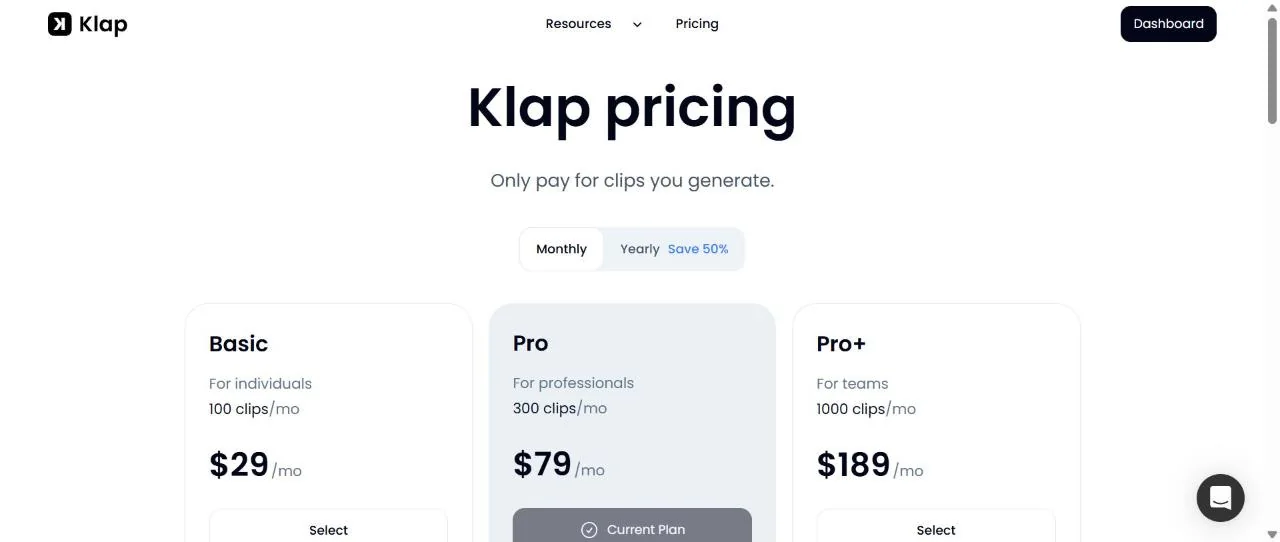
Other rules we read on the page: the free trial covers one video, downloads and posts need a paid plan, and paid exports carry no Klap branding. You can cancel any time and the plan stays active until the end of the period. The refund rules differ by billing: a monthly plan can be refunded in the first month, and for up to your last three months in a row if you did not use Klap, while a yearly plan gets a full refund in the first month, then one twelfth of the price for each full unused month, up to three. The Klap API is priced separately, at $0.44 per input video, $0.32 per short and $0.48 per export.
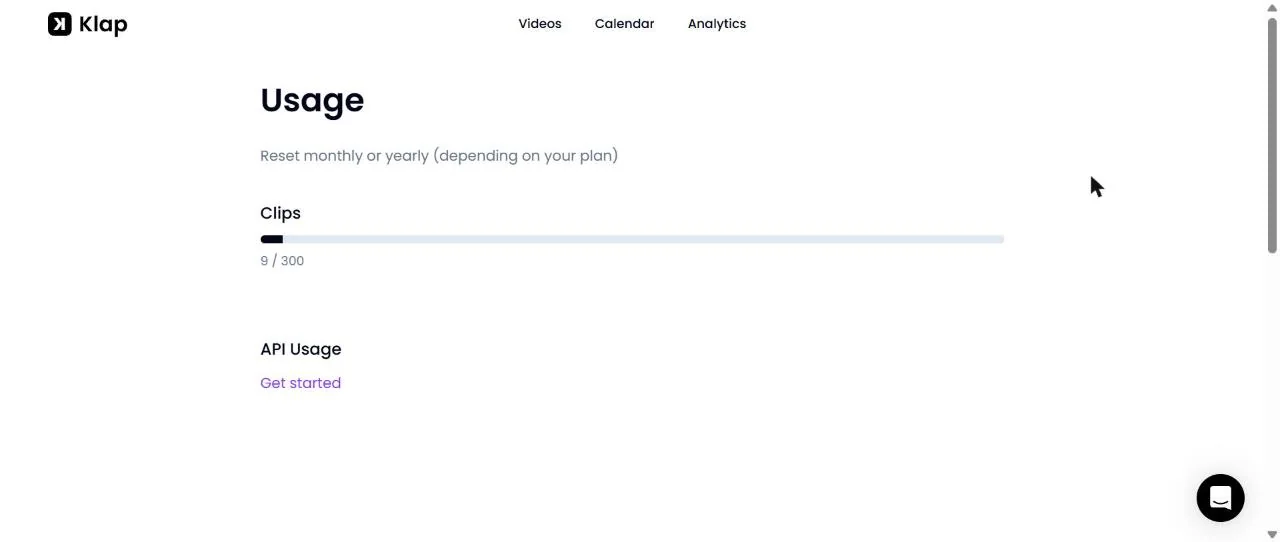
About the counter: on the Usage page, the first run of nine shorts plus one export showed 9 / 300, so exporting a clip you already made does not cost another clip. After the second round of four clips, which brought the list to 13 shorts, the page showed 11 / 300, and it still did when we checked again later the same day. We have no explanation for the gap of two. Check the counter yourself before you plan around it.
What did we not test, and what went wrong?
- Publishing, calendar and analytics. Klap says it posts to TikTok, YouTube, Instagram, LinkedIn and Facebook. Our account had no social account connected, so we did not publish anything. The Calendar and Analytics pages greet you with a “will appear here” message, and behind the Analytics message there is an example chart with numbers that are not ours. We did not use any of it.
- An English video. All of this was on a French source. The French transcript matched our script, but we cannot tell you how the English transcript or English prompts behave.
- Speaker tracking. Our video has no speaker on screen.
- A rival on the same video. We did not run the same video through OpusClip or Vizard, so we make no claim about which one picks better clips. For the plan-by-plan comparison, see our Opus Clip page and our Vizard page.
- Smaller things. The first load of the editor showed a spinner for a few seconds, one export sat at 99% for about a minute, and the clip list shows low-resolution previews. None of it blocked us.
Klap vs OpusClip in one paragraph
Both clip long videos and both score the clips. On the pricing pages we read, Klap counts clips and OpusClip counts credits, and OpusClip’s yearly Pro plan is also $14.50 a month, while Klap’s equivalent starts at $14.50 for Basic and $39.50 for Pro. They are not the same product at the same price, and we did not test OpusClip, so we wrote a separate page with the plan-by-plan details.
Who is Klap for?
- Podcasters, YouTubers and webinar hosts who want a steady stream of clips from long recordings, and who prefer counting clips to counting minutes.
- Anyone who wants to test fast: five minutes from link to finished shorts is easy to try on a video you already have.
- Creators in other languages: the French run worked without any special setup.
It is a weaker fit if you need to generate the footage first, or if your video has no speech to analyze. If a big share of your work is publishing and analytics, test that part before you pay, because it is the part we could not.
Is Klap worth it? Our verdict
For cutting a long video into short clips, Klap did what it promised in our test, quickly and with a clean export. The picks were sensible, the captions were right, and the pricing is easy to read. We would not buy a yearly plan on our test alone, because we could not check posting or analytics, and the claims about scores predicting views remain the AI’s opinion until you publish. Run one of your own videos through the free trial, read the clips, and decide from there. If you are shopping across tools, our Vizard and Opus Clip pages cover the alternatives.
Try Klap on a video you already have. One video is free to run and edit. Paid plans start at $14.50 a month billed yearly.
FAQ
What is Klap?
Klap (klap.app) is a web app that turns a long video into vertical shorts for TikTok, Reels and YouTube Shorts. You paste a link or upload a file, the AI picks the moments, scores them, reframes them to 9:16 and adds animated captions. You can then edit, download, schedule or publish each clip.
Is Klap free?
Only as a trial. According to Klap's pricing page, you can run one video for free with no credit card, preview and edit the clips, but downloading and posting them needs a paid plan. We tested on the Pro plan, which Klap gave us for 30 days, so we cannot show you what the free trial exports.
How much does Klap cost?
Prices read on klap.app/pricing on November 8, 2026: Basic $29 a month or $14.50 a month billed yearly ($174), Pro $79 or $39.50 ($474), Pro+ $189 or $94.50 ($1,134). The plans include 100, 300 and 1,000 clips a month. One short counts as one clip, and the length of the source video does not use up the plan.
How long does Klap take to process a video?
Our 6-minute video took about five minutes from the click on Generate to nine finished shorts. Klap shows the stages: preparing media, analyzing video, transcribing audio, extracting the best topics and processing captions. Extra clips requested by prompt took about 35 seconds. Each export took roughly two minutes.
Does Klap add a watermark?
Not on paid plans, according to Klap, and not on our files. The two clips we exported on the Pro plan were clean 1080 x 1920 MP4s at 30 frames per second. In the clip list, previews are labelled low resolution, so judge quality from the export.
Does Klap work in other languages than English?
Yes. Klap lists 99+ languages. It detected French on our video, transcribed it correctly in the clips we read, and wrote the titles and the virality explanations in French. We also translated the captions of one clip to English in about 25 seconds. The translation menu offers 54 languages, and the voice stays in the original language.
Can I ask Klap for a specific moment?
Yes, with a text prompt in the Create shorts window. A prompt written in French found four moments on our French video in about 15 seconds. The same kind of prompt written in English returned the message that Klap could not find a moment, so write the prompt in the language of the video.
What did we not test?
Publishing to social networks, the calendar and the analytics, because we connected no account. We also did not run an English-language source video. The calendar and analytics pages show example data until you publish, and we did not count it as results.