Short answer: Klap and OpusClip do the same job: they cut a long video into scored vertical clips with animated captions. The difference we can document is how they charge and what each plan includes. Klap counts clips and keeps its plans short. OpusClip counts credits and adds more on Pro, such as other aspect ratios, team seats and export to editing software. We tested Klap on a real video. We did not test OpusClip, so we cannot say which one picks the better clips.
We tested Klap on November 8, 2026 on the Pro plan, which Klap gave us for 30 days. We earn a commission on Klap through our links. We have no affiliate link for OpusClip, and the OpusClip facts below come from its official pricing page, read the same day. This page contains affiliate links (disclosure).
Klap vs OpusClip at a glance
| Klap | OpusClip | |
|---|---|---|
| What you pay for | Clips generated (1 short = 1 clip) | Credits |
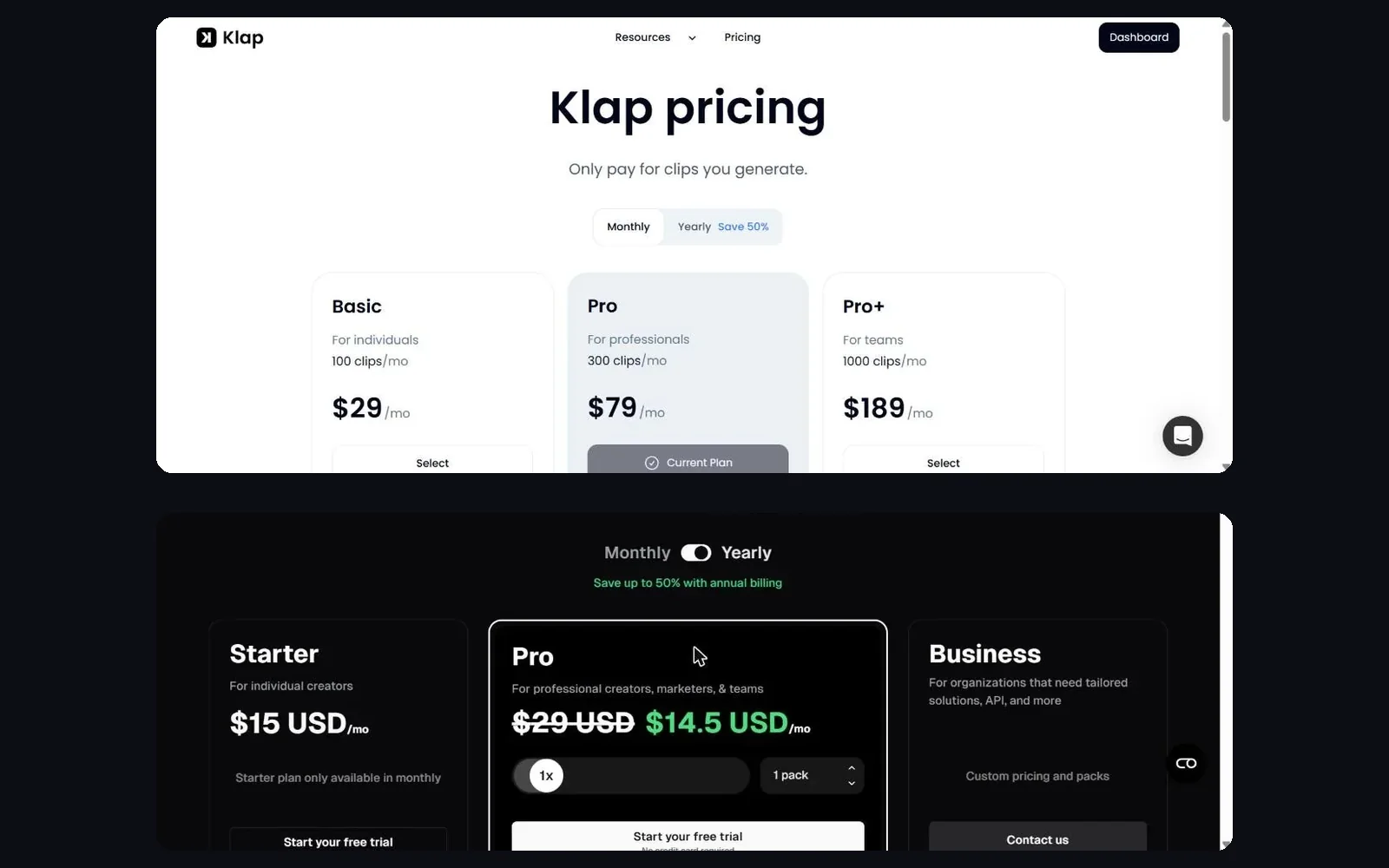
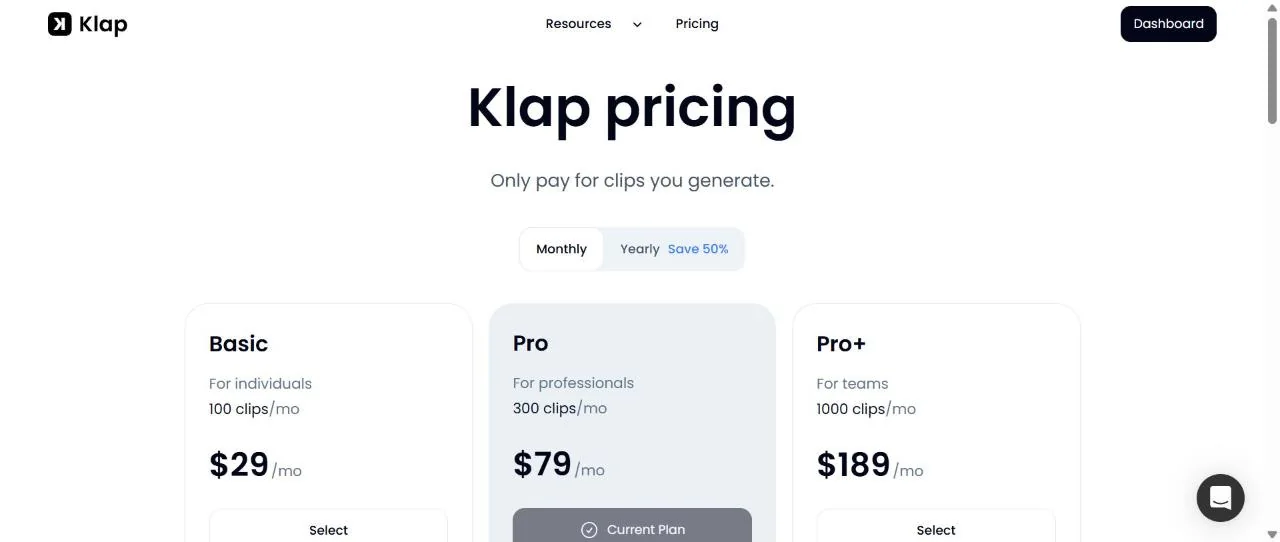
| Entry paid plan | Basic: $29 a month, or $14.50 yearly, 100 clips | Starter: $15 a month, monthly only, 150 credits |
| Mid plan | Pro: $79 a month, or $39.50 yearly, 300 clips | Pro: $29 a month, or $14.50 yearly, 3,600 credits over 12 months |
| Top plan | Pro+: $189 a month, or $94.50 yearly, 1,000 clips | Business: custom |
| Free option | Trial of 1 video, preview and edit, no download | Free plan: 60 credits a month, 1080p, watermark, no editing, exports expire after 3 days |
| Source limit | Up to 3 hours | Local upload up to 10 GB (Free, Starter) or 30 GB (Pro) |
| Social accounts | Unlimited | 6 connections on Pro |
| We tested it | Yes, Pro plan | No |
What is Klap?
Klap is a web app that turns a long video into short vertical clips. According to its pricing page, each plan includes a virality score, reframing on the active speaker, animated captions, 99+ languages, scheduling and publishing, unlimited social accounts, analytics and an editor with b-roll and hook titles. We cover what we saw in detail in our Klap review.
What we saw in our test, on a French 6-minute tutorial of ours: nine shorts of 16 to 37 seconds in about five minutes, each with a score from 88 to 72 and a written reason, clean 1080 x 1920 exports without a watermark, and a caption translation to English in about 25 seconds. We did not connect a social account, so we did not test publishing, the calendar or the analytics.
What is OpusClip?
OpusClip is the better-known tool in this category. Its pricing page lists AI clipping with a virality score and animated captions in 20+ languages on the Starter plan, and an editor, a filler and silence remover, and auto-posting to YouTube Shorts, TikTok and Instagram Reels. The Pro plan adds a Viral Hook, motion graphics, AI b-roll, input from 10+ sources, export to Premiere Pro and DaVinci Resolve, aspect ratios of 9:16, 1:1 and 16:9, a scheduler, custom fonts, speech enhancement, video dubbing and limited API access. We reviewed it earlier on our Opus Clip page.
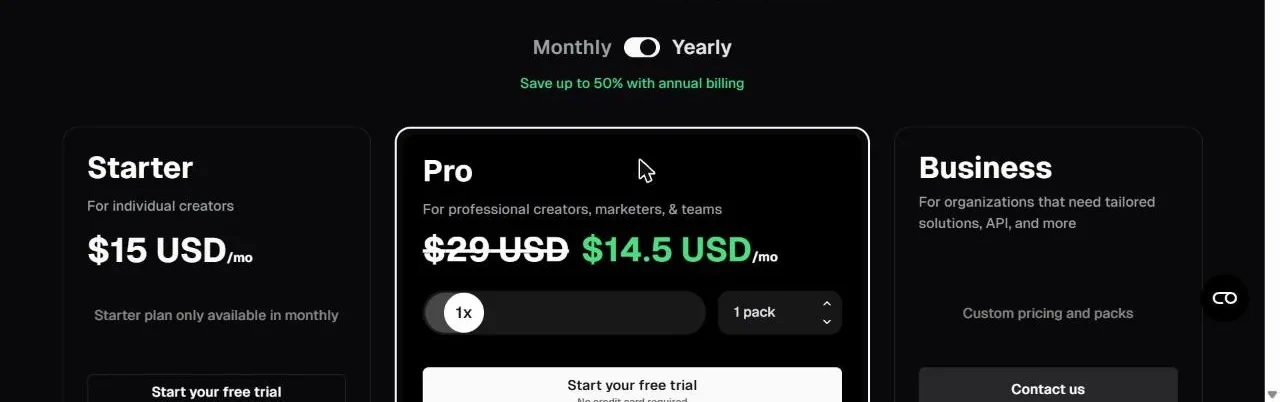
We did not run OpusClip. Everything in this section is what its own page says, not a result of ours.
Klap vs OpusClip pricing
Look at the two pricing models side by side, and watch the units.
- Klap bills clips. Basic gives 100 clips a month, Pro 300 and Pro+ 1,000. Yearly plans give the whole year at once: 1,200, 3,600 or 12,000 clips. The length of your source does not use the plan, so a 3-hour podcast and a 3-minute clip cost the same to ingest, and you pay for what comes out. Our arithmetic from the listed prices gives about $0.13 per clip on Pro yearly and $0.26 on Pro monthly.
- OpusClip bills credits. Starter is $15 a month for 150 credits, and it is not offered yearly. Pro is $29 a month, or $14.50 a month billed yearly ($174), with 3,600 credits over 12 months and unused credits rolling over for 2 months. The pricing table we read does not say how many minutes of video a credit covers, so we cannot convert it to a cost per clip. Find out before you commit.
- The headline numbers are not comparable. Klap’s yearly Pro and OpusClip’s yearly Pro both list 3,600 of something, but one is clips and the other is credits. $39.50 against $14.50 a month says nothing until you know how many credits your videos use.
Free plans and trials
The free options are very different, and this is where a short test is cheap.
- OpusClip Free is a permanent plan: 60 credits a month, clips up to 1080p, auto reframe, captions with emoji and keyword highlight, a watermark, no editing, and exports that are no longer available after 3 days. Starter and Pro also offer a free trial with no credit card, according to the page.
- Klap’s trial covers one video with no card: it generates the clips and lets you preview and edit them, but downloading and posting need a paid plan, and paid exports carry no Klap branding.
If you only want to see the clips, Klap’s trial is enough. If you want a real file to look at, the OpusClip free plan gives you one, with a watermark.
Formats, languages and team limits
From the two official pages:
| Klap | OpusClip | |
|---|---|---|
| Vertical 9:16 | Yes (the setting we used) | Yes, all plans |
| Square and landscape | Not tested by us | 1:1 and 16:9 on Pro |
| Caption languages | 99+ listed; we translated captions to English, with 54 languages in the menu | 20+ on Starter, per the page |
| Dubbing | Not listed on the pricing page | Video dubbing on Pro |
| B-roll and hooks | B-roll and hook titles in the editor | AI b-roll and Viral Hook on Pro |
| Export to Premiere or DaVinci | Not listed | Pro |
| Team seats | Not stated on the pages we read | 2 seats on Pro |
| API | Self-serve, $0.44 per input video, $0.32 per short, $0.48 per export | Limited API access on Pro |
Two reading notes. First, “not listed” means we did not find it on the pricing pages, not that the feature is missing. Second, we used Klap only in 9:16, so we cannot say how its other formats look.
Which one should you choose?
We can narrow this down by what the pages document and by what we saw, without declaring a winner on clip quality.
- Choose Klap if you prefer to pay per clip, you want every plan to include publishing to five networks and unlimited accounts, and you value a plain plan list with few add-ons. Our test showed a fast run and clean exports.
- Choose OpusClip if you need square or landscape exports, two team seats, export to Premiere Pro or DaVinci, dubbing or AI b-roll, and you are happy to work out the credits for your videos. It also has the free plan that gives you a real, watermarked file.
- Try both free options on the same file if clip quality is what matters most. That test is the one thing neither page can answer for you, and it is the one we did not run.
Test Klap on a video you already have. The trial covers one video with preview and editing. Paid plans start at $14.50 a month billed yearly.
Verdict
On the facts we have, this is a pricing-model choice more than a quality verdict. Klap is simpler, with a clip count you can plan around. On price, both start at $14.50 a month billed yearly (Klap Basic, OpusClip Pro), and month to month OpusClip Starter is cheaper at $15 against $29 for Klap Basic. OpusClip is broader on the Pro plan and has a free plan with a real export. We tested one of the two, so the fair conclusion is to run the same video through both free options, then pick on the clips you prefer and on how your own volume plays out in clips or in credits.
Related reads
If you want the full test of one of the two tools, start with our Klap review or our Opus Clip review. For a third option see Vizard, and for a different approach to repurposing see Revid vs Opus Clip vs Submagic.
FAQ
Is Klap cheaper than OpusClip?
It depends on the plan and on what you count. On the pages we read on November 8, 2026, Klap's yearly Pro plan is $39.50 a month for 300 clips, while OpusClip's yearly Pro plan is $14.50 a month for 3,600 credits over 12 months. Klap's entry plan, Basic, is also $14.50 a month yearly, for 100 clips. The units differ, so compare them on your own videos.
What is the difference between a Klap clip and an OpusClip credit?
Klap counts each short it generates as one clip, and the length of the source video does not use up the plan. OpusClip sells credits, and the pricing table we read does not say what one credit covers, so check its help pages before you buy.
Which one has a better free plan?
OpusClip has a free plan with 60 credits a month, 1080p clips and a watermark, no editing, and exports that stop working after 3 days. Klap has a free trial of one video that you can preview and edit, but downloading and posting need a paid plan.
Did you test OpusClip?
No. We ran a 6-minute video through Klap on the Pro plan, which Klap gave us for 30 days. OpusClip's side of this page comes from its official pricing page, read on November 8, 2026. We cannot tell you which tool picks better clips.
Which one posts to social networks?
Both say they do. Klap lists TikTok, YouTube, Instagram, LinkedIn and Facebook with unlimited social accounts on every plan. OpusClip lists auto-posting to YouTube Shorts, TikTok and Instagram Reels, and a scheduler plus 6 social account connections on Pro. We did not connect an account on either.
Where does the OpusClip information come from?
From OpusClip's official pricing page and plan comparison table, read on November 8, 2026. Prices and limits change, so check the live page before you buy.