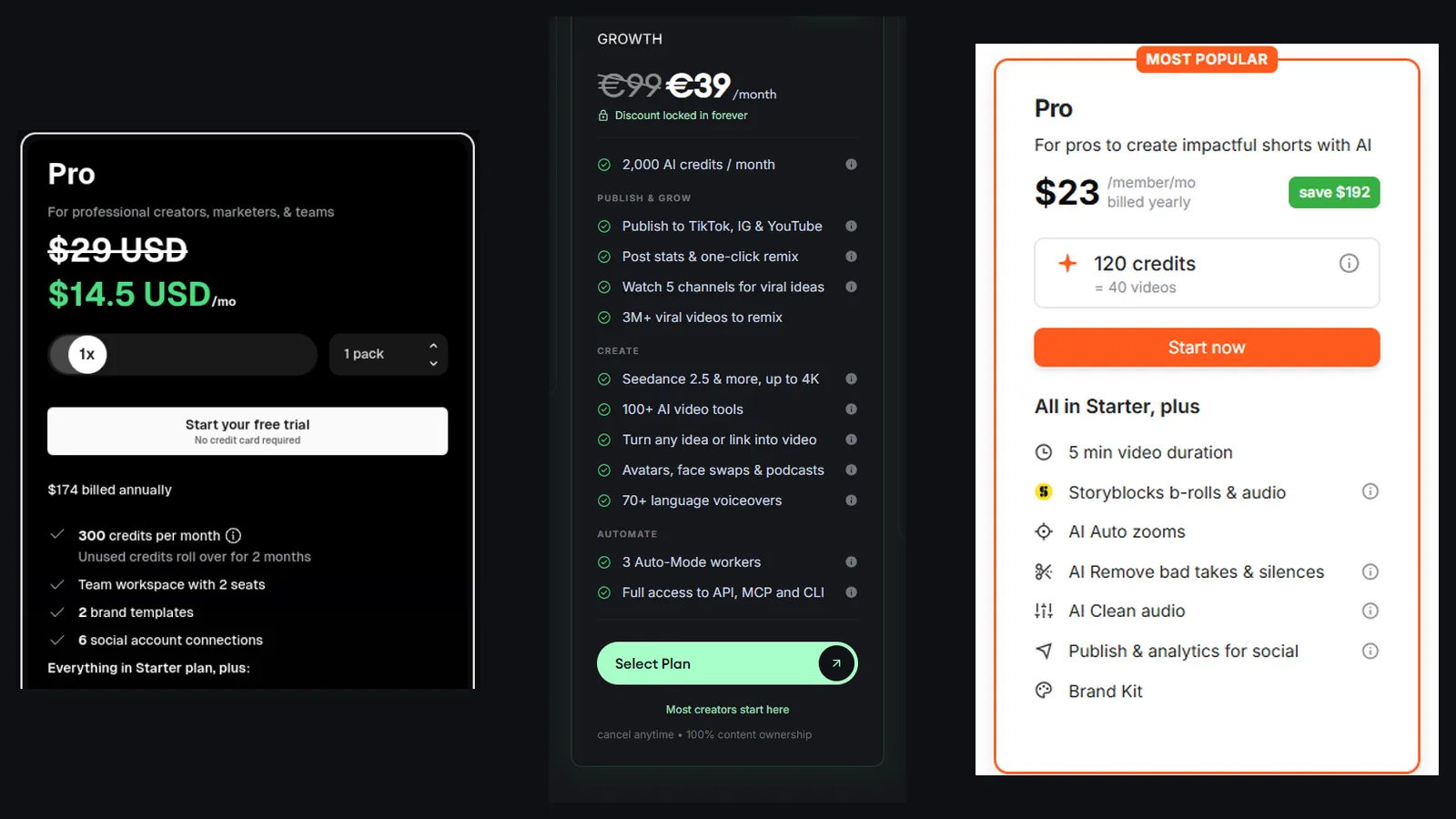
Short answer: pick by what you have in your hands. No footage, you want finished faceless videos: Revid. A long recording to mine for clips: Opus Clip. Footage you shot and want to make look current with captions and cleanup: Submagic. They are rarely substitutes, since one creates, one cuts and one polishes. Entry prices on October 24, 2026: Revid Growth $39 a month for 2,000 credits, Opus Clip Starter $15 a month, Submagic Starter $19 a month or $12 billed yearly.
Prices read on the official pages on October 24, 2026; Revid’s free script generators tested hands-on. Links to Revid and Submagic are affiliate links, the Opus Clip link is a plain link (disclosure).
No footage? Start with Revid. Its script generators work with no account, and new subscribers get 20% off the first month with code BEKOE.
Revid vs Opus Clip vs Submagic: the one-minute version
| Revid | Opus Clip | Submagic | |
|---|---|---|---|
| Main job | Create short videos from an idea, script, link or viral reference | Cut long videos into short clips | Add captions, B-roll and cleanup to your footage |
| You bring | A script, prompt, link or nothing | A long video | A finished or raw clip |
| Entry price | $39/mo (Growth) | $15/mo (Starter) | $19/mo, $12/mo billed yearly |
| Free way in | Free script and hook tools, starter credits | Free plan | “No credit card required” start |
| Pricing unit | Credits, 2,000/mo on Growth | Credits, 150/mo on Starter | Credits, 45 on Starter (about 15 videos) |
| Publishing | TikTok, Instagram, YouTube | Shorts, TikTok, Instagram | Included on Pro and above, per its page |
| Generates new footage | Yes | No | No |
If your eyes glazed over: the three tools sit at different points in a video’s life. Revid is before the camera, Opus Clip is after a long recording, and Submagic is the last coat of paint.
What does Revid AI do?
Revid is an end-to-end short-form video platform. According to its documentation, it keeps a library of about 2.77 million short videos with public stats, lets you start from a format that already performed, writes an original script, generates visuals with models such as Seedance 2.5 and Veo 3, adds an ElevenLabs voice, captions and music, and publishes to TikTok, Instagram and YouTube. It also includes Auto-Mode workers that make one video a day each, plus an API, an MCP server and a CLI.
We tested the free TikTok and YouTube Shorts script generators. They returned three scripts in about 30 seconds, signed out, with a clear hook and spoken rhythm, and a habit of inventing first-person anecdotes and small statistics. Check the rendered video yourself on your first run. Read the full Revid AI review for the test notes and the pricing table, and the Revid AI free guide for the no-account tools.
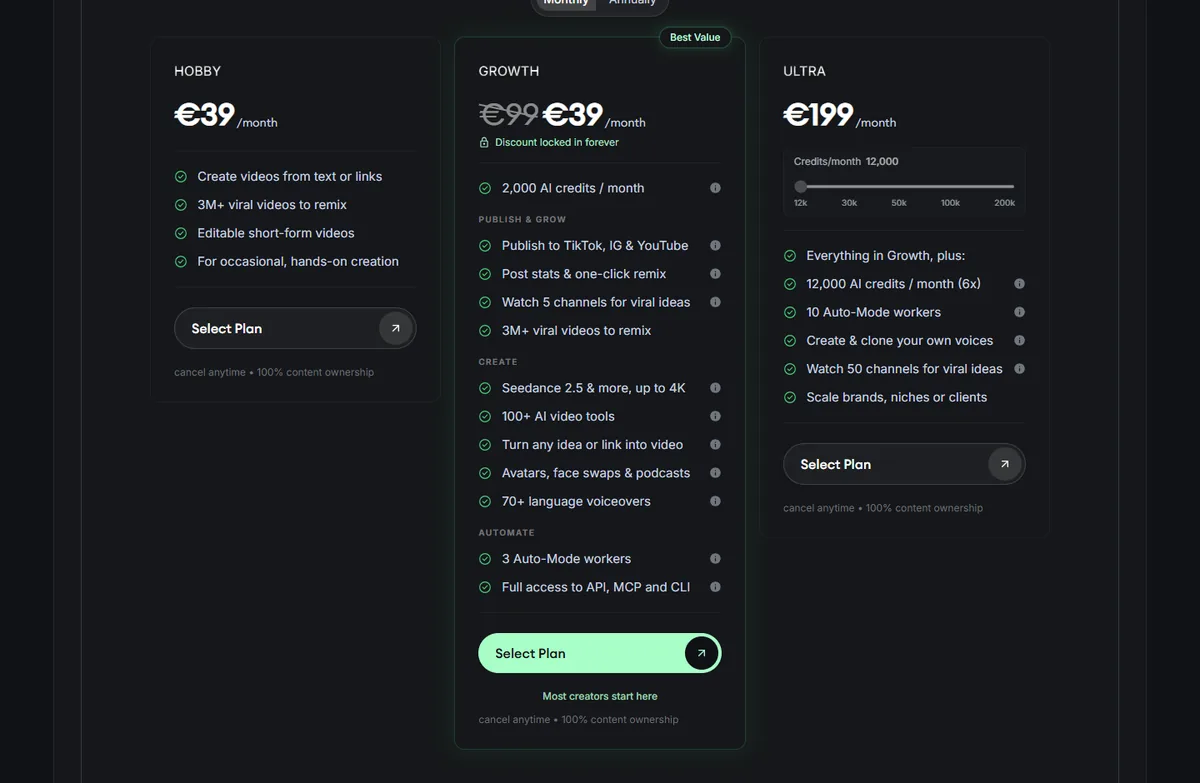
Price: Growth is $39 a month or $32 billed yearly for 2,000 credits. Ultra is $199 a month ($166 yearly) for 12,000. Hobby shows $39 with no credits listed. Revid estimates 40 to 80 credits for a 30-second video with Pro moving images.
What does Opus Clip do?
Opus Clip analyzes a long video, picks the segments most likely to work as shorts, reframes them to vertical, adds animated captions and lets you publish. The unit it sells is minutes processed. In our earlier review, a 30-minute podcast uses 30 credits whether it yields one clip or fifteen, which keeps costs predictable.
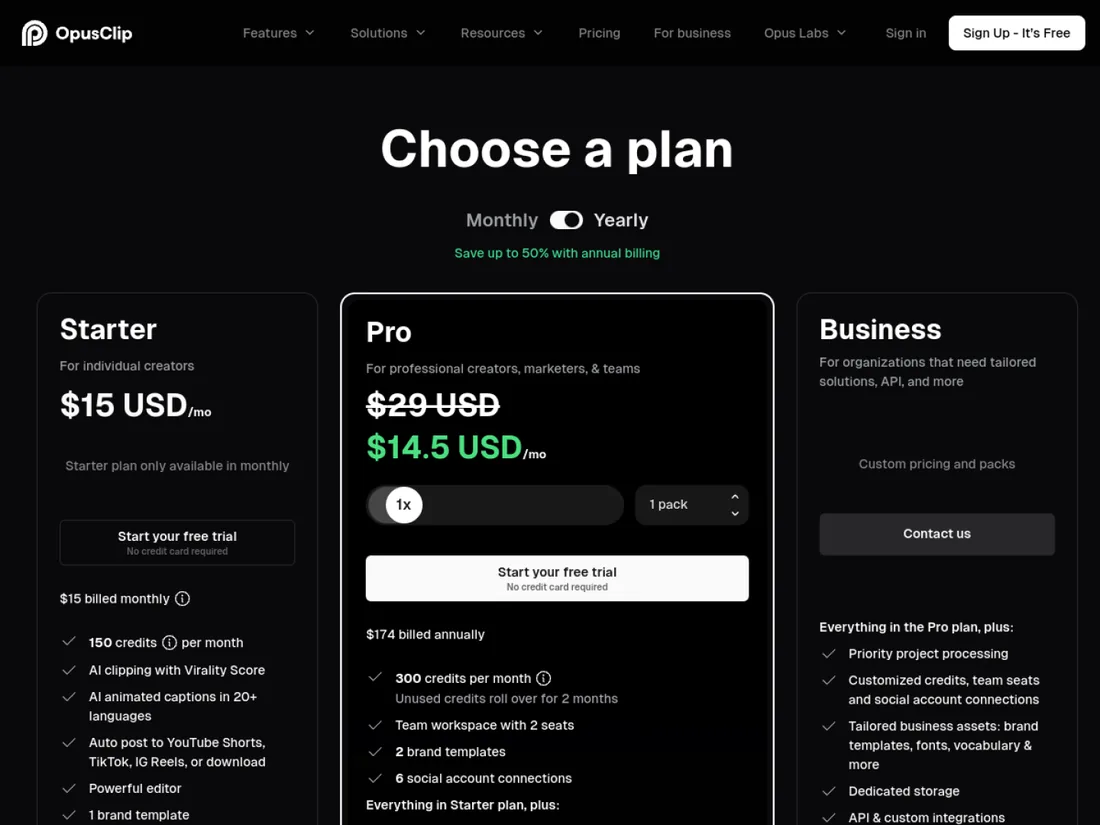
Price: a free plan exists; Starter is $15 a month (150 credits, monthly billing only); Pro is $29 a month or $14.50 billed annually ($174 a year) for 300 credits with a two-seat workspace, six social account connections and a two-month rollover of unused credits. Business is custom. Our Opus Clip review lays out the free-plan limits, and the Vizard review compares a close rival.
Official site: Opus Clip.
What does Submagic do?
Submagic is a post-production layer. Upload a video and it adds animated captions in current short-form styles, free B-roll and audio, auto zooms and hook titles, and removes silences and bad takes. It does not generate footage. Its own page positions it for editing shorts “10x faster”.
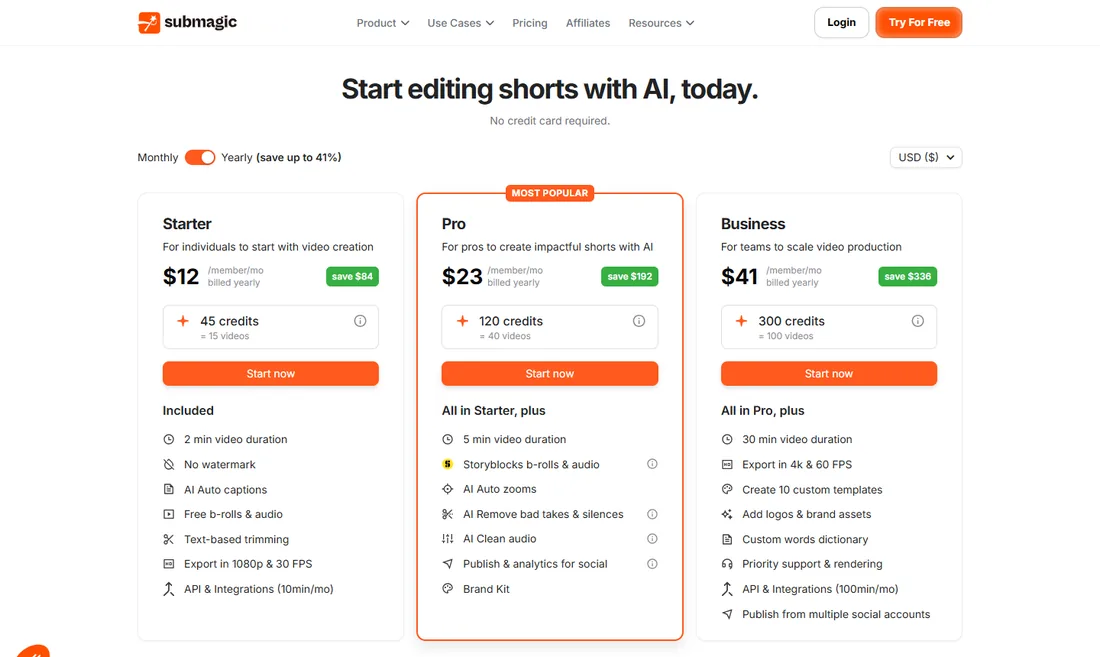
Price: Starter is $19 a month or $12 billed yearly (45 credits, about 15 videos, 2-minute videos, 1080p at 30 fps, no watermark). Pro is $39 or $23 (120 credits, about 40 videos, 5-minute videos, B-roll, auto zooms, publishing and analytics). Business is $69 or $41 (300 credits, about 100 videos, 30-minute videos, 4K at 60 fps). No credit card is required to start, per the page. Our Submagic review covers the feature set.
Official site: Submagic.
Capability matrix: what each tool really covers
We use plain labels, not a made-up total score, because a single number would hide the point: each tool is strongest on a different row. “Strong” means it is the tool’s main job. “Partial” means it offers the feature but it is not the core product. “No” means we found no such feature. Where the cell is based only on documentation or a free tool, we say so.
| Job | Revid | Opus Clip | Submagic |
|---|---|---|---|
| Create a video from a script or prompt | Strong | No | No |
| Start from a viral reference video | Strong (library and remix, per Revid) | No | No |
| Cut a long video into clips | Partial (long-to-shorts tool, untested by us) | Strong | No |
| Animated captions on your footage | Partial (caption tool and 16 presets, untested by us) | Strong (animated captions in 20+ languages) | Strong |
| B-roll, auto zooms, silence removal | Partial (B-roll option in the caption tool) | Partial | Strong |
| Generated voice-over in many languages | Strong (70+ languages) | Partial (AI voice-overs on paid plans) | No |
| Scheduling and publishing | Strong (TikTok, Instagram, YouTube) | Strong on paid plans | Strong on Pro and Business |
| Daily automation | Strong (Auto-Mode workers) | No | No |
| API access | Strong (all paid plans, plus MCP and CLI) | Partial (Pro and Business listings mention MCP, API) | Partial (API minutes by plan) |
| Predictable price per output | Medium (credits depend on model) | Strong (per minute of source) | Strong (per video) |
Two cautions on the table. First, Revid’s “Partial” cells come from its documentation, not from a test we ran. Second, the Opus Clip and Submagic cells come from their pricing pages and our earlier reviews. If any of those cells decides your purchase, run a 10-minute trial on your own footage first.
Where Revid overlaps with the other two
The overlap is real, which is why people search for this comparison. Revid’s public tools page includes a long-video-to-short converter that takes a YouTube link or an uploaded audio or video file, adds captions and relevant visuals, and shows “about 10 credits” before you click Generate. That is Revid’s answer to Opus Clip. Revid also has an “Add Caption to Video” tool that transcribes speech in 100+ languages, with an optional B-roll insertion, which is its answer to Submagic.

The pages tell us the design intent. Revid’s version is framed as turning spoken content into a captioned video with relevant visuals and short-form pacing, which is closer to “make a new short from this audio” than to “find the best 30 seconds and keep my footage”. Opus Clip is the other way round: it keeps your picture and chooses the moments. Neither approach is better in general. It depends on whether your footage is worth keeping.
How to compare the three on your own footage in an hour
Do not trust our table over a test on your own material. This protocol takes about an hour and costs nothing if you stay on free tiers:
- Pick one 20-minute recording of yourself or your show, with clear speech.
- Opus Clip: drop the link or file in, wait for the clip list, and note how many of the top five clips you would actually publish.
- Revid: run the same recording through the long-video-to-shorts tool, and read the credit estimate first. Note whether the result keeps your footage or builds new visuals.
- Submagic: take the best 60-second clip and run it through captions and zooms. Compare the caption styles with Revid’s presets.
- Judge on three questions: how many minutes of fixing each output needed, whether the captions are readable on a phone, and what the same volume would cost per month.
The tool that needs the fewest minutes of fixing is the one worth paying for, whatever its ranking in anyone’s article.
How much does each tool cost for a real month?
Entry prices do not tell you much. These three scenarios use the rates on the pages we captured. They are our arithmetic and assume one tool per job.
| Scenario | Revid | Opus Clip | Submagic |
|---|---|---|---|
| 20 faceless Shorts a month, nothing filmed | Growth $39. At Revid’s 40 to 80 credits per video, 20 videos use 800 to 1,600 of 2,000 credits. | Cannot do it | Cannot do it |
| 4 one-hour podcast episodes cut into clips | Possible with the long-to-shorts tool, cost untested | Pro $29, or $14.50 billed yearly. Four hours is 240 credits by the per-minute rule in our review, beyond the 150 on Starter | Does not cut long videos |
| 30 talking-head clips a month needing captions | Possible with the caption tool, cost untested | Possible, caption tool is part of clipping | Pro $39, or $23 billed yearly (about 40 videos) |
The pattern: Revid wins where nothing exists yet, Opus Clip wins where a long recording exists, and Submagic is the cheapest way to make clips you already shot look good. If you try to make Revid do clipping, or Opus Clip do generation, you pay for the wrong thing.
Who wins for which profile?
- Faceless TikTok or Shorts channel with no camera: Revid. It is the only one of the three that creates footage. Our free test of its script generator shows the script side works; you still need to edit invented anecdotes.
- Podcaster or webinar host: Opus Clip. Its product is built for exactly this, and the free plan lets you judge clip selection on your own episode.
- Coach or creator who films on a phone: Submagic. Captions, zooms and cleanup are what your raw video lacks.
- Agency running many client channels: Revid, for Auto-Mode workers and API, plus Opus Clip when the client sends long recordings.
- Developer or AI-agent builder: Revid, because every paid plan includes the API, MCP server and CLI.
- Budget under $20 a month: Submagic Starter billed yearly or Opus Clip Starter. Neither creates footage, so be sure you have some.
- Long-form faceless YouTube (10 minutes): none of the three. See our NimbleVid review, or the seven alternatives to Revid.
Can you combine Revid, Opus Clip and Submagic?
Yes, with a clear workflow:
- Revid makes the faceless videos you did not shoot.
- Opus Clip turns your long interviews and podcasts into clip candidates.
- Submagic polishes the talking-head clips you filmed, adding captions and zooms.
At entry prices that stack costs about $39 plus $15 plus $12 to $19 a month, between $66 and $73. That is only worth it if you really produce all three kinds of content. Revid’s own documentation recommends a dedicated clipping tool such as Opus Clip when clipping your own long recordings is the main need, which tells you its makers see the same split.
What to watch out for with each tool
- Revid: credits do not roll over, premium models can use hundreds of credits per clip, and the free script generator can invent stories and numbers. Hobby and Growth show the same $39 price, with credits and publishing listed only on Growth.
- Opus Clip: the Starter plan is monthly only, free exports are watermarked on caption templates and expire quickly, and clip selection should be checked against your own footage.
- Submagic: it does not generate footage, and Starter videos cap at 2 minutes.
- All three: prices and credit rules change often, so use the pricing pages, not older articles, including ours, for a final decision.
Verdict: which should you choose?
Choose by the thing in your hands. If your hands are empty, pick Revid and try its free tools first. If you hold a two-hour recording, pick Opus Clip. If you hold a finished clip that looks plain, pick Submagic. When people ask us for a single winner, we decline, because a ranking would reward the tool with the widest job, not the one that fits yours.
Starting from zero? Try Revid’s free script generator, then check the estimated credit cost of one video before you pick a plan. New subscribers: code BEKOE takes 20% off the first month.
FAQ
What is the difference between Revid, Opus Clip and Submagic?
They do three different jobs. Revid creates short videos from a script, prompt, link or viral reference, with visuals, voice, captions and publishing. Opus Clip takes a long video you already have and cuts it into short clips. Submagic takes footage you already have and adds captions, B-roll, zooms and cleanup. Revid is a generator, Opus Clip is a clipper and Submagic is a caption layer.
Which is cheapest: Revid, Opus Clip or Submagic?
On entry price, Submagic at $12/month billed yearly ($19 monthly) and Opus Clip at $15/month are cheaper than Revid Growth at $39/month ($32 billed yearly). That is not a like-for-like comparison, because Revid generates videos from nothing and uses a credit system with 2,000 credits a month, while the other two process footage you provide.
Can Revid replace Opus Clip?
Partly. Revid has a long-video-to-shorts tool that cuts YouTube videos into clips with auto-reframing, listed at about 10 credits for the reframe step. Opus Clip is built entirely around clipping, with a virality score and a dedicated editor. Test both on the same recording before you drop one.
Can Revid replace Submagic?
Partly. Revid has 16 caption presets such as Hormozi, Faceless and Beat, plus a tool that adds captions to an existing video in 100+ languages. Submagic is built around caption quality plus B-roll, auto zooms and silence removal for footage you shot. Judge it on a clip of your own.
Do Opus Clip and Submagic generate videos from a script?
No. Neither creates footage from a prompt or script. Both start from video you give them. If you have no footage and no camera, you need a generator such as Revid, InVideo AI or NimbleVid.
Is it worth using all three tools together?
Only if each saves more time than it costs. A typical stack is Revid for faceless videos, Opus Clip for long recordings and Submagic for polishing talking-head clips. At entry prices that is about $39 plus $15 plus $12 to $19 a month. Most people should start with the one tool that matches their raw material.