Short answer: Monty is an AI agent that edits vertical talking-head videos. You give it a take where you speak to the camera, and it cuts the pauses and flubs, burns in word-by-word captions, adds music and illustrative b-roll, and hands back a 1080 x 1920 MP4 plus ready-to-paste titles and captions. In our test, a 47-second take came out at 24.7 seconds with no blanks left. It is in beta, publishing is not wired yet, and you should watch the whole export before you post it. Verdict: 3.5 out of 5, worth a free trial on your own footage.
Tested on October 25, 2026 on the free plan, with access provided by the publisher. This page contains affiliate links (disclosure).
Monty review at a glance
- The cutting works. 47.0 seconds of French speech with 7.3 seconds of planted blanks, an “um” and a restarted sentence became a 24.7-second master with no silence over 0.3 seconds. A 52.5-second take became 27.5 seconds.
- Captions were accurate. Word-by-word captions matched the speech in English (a real speaker) and in French, accents included, even though French is not on the website’s language list.
- Publishing texts are ready. Title, description and tags for YouTube, a caption for Instagram and a title for TikTok, written for you.
- It is fast. 8 to 12 minutes from upload to MP4, including preview and a 3.5 to 4.5 minute final render.
- Things to watch: a watermark on the free plan, generated hooks that need a read, a full-screen green shot in 2 of our first 3 French renders, no direct publishing yet, and no built-in voice or avatar.
Try Monty on your own take. The free plan gives you 3 videos a month. Creator starts at $29/month, and the code BEKOE takes 30% off the first payment according to the partner terms.
What is Monty?
Monty (monty.fast) is a web app for short-form creators who talk to a camera. It is not a video generator: it does not invent scenes or voices. It works on your footage. The new-project page offers exactly two ways in: upload a recording you already have, or let Monty write a script for your topic and record it in the browser with a teleprompter.
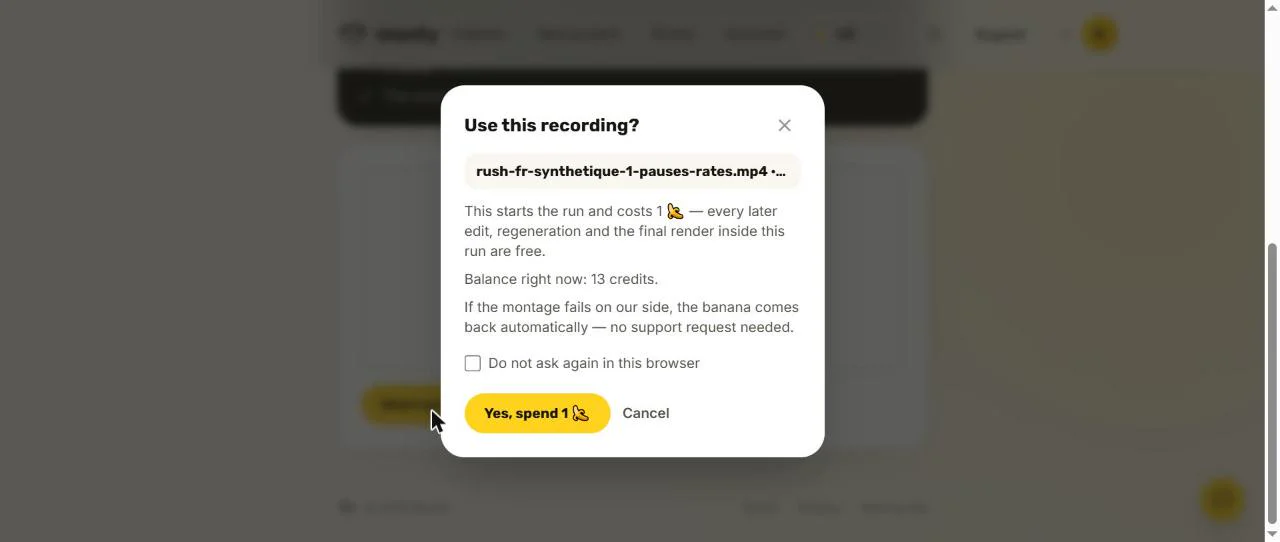
Either way, the pipeline is the same. Monty transcribes the speech, decides what to keep, builds a plan beat by beat, shows you a vertical preview with a quick editor, and renders a final video once you click “Approve and render”. It charges one credit (a “banana” in the app) per run, with a confirmation dialog that states the cost and the balance before anything starts. If the montage fails on their side, the dialog says the credit comes back automatically.
If you are comparing editing tools for Shorts and Reels, see how Monty differs from Submagic, Opus Clip and Revid further down.
How we tested Monty
We ran six runs on the free plan on October 25, 2026, in Chrome on Windows, and we did not buy anything. Our inputs were a French take we prepared with planted flaws (so we knew exactly what Monty should remove), a real English speaker from a free-licence stock clip, a script-from-topic run, and a long file to probe the 3-minute limit.
| Run | Input | Result | Time we measured |
|---|---|---|---|
| 1 | French take, 47.0 s, three planted blanks, an “um” and a flubbed sentence | 24.7 s master, 1080 x 1920 | Plan and preview 4 to 7 min, final render about 3 min 40 |
| 2 | Real English speaker on stage, 47 s, 1280 x 720 | 37.7 s master | Preview about 6 min, final render about 4 min 40 |
| 3 | French script generated from a topic | About 150 words in roughly a minute | About 1 min |
| 4 | 3 min 45 file (one take looped five times), 480p | 31-second preview, not rendered | Preview about 5 min |
| 5 | Run 1 take, second pass, no edits | 24.7 s master | Preview about 3 min 30, final render about 3 min 40 |
| 6 | New French take, 52.5 s, two long pauses and a restarted sentence | 27.5 s master, no green shot | Plan and preview about 8 min, final render about 3 min 30 |
Each run cost one credit, so we spent six. The publisher states a 10 to 15 minute edit on the new-project page and “about four minutes” on the homepage; on our 47 to 52-second files the full journey took 8 to 12 minutes.
How well does Monty cut pauses and flubs?
This is where Monty earns its place. Our first French take lasted 47.0 seconds, including 7.3 seconds of deliberate blanks (2.5, 1.8 and 3.0 seconds). The master lasts 24.7 seconds, 47% shorter, and a silence scan of the file finds nothing longer than 0.3 seconds. The flubbed sentence was removed and the clean restart kept. Two small leftovers: a stray one-word caption of about half a second and a one-letter caption fragment, both fixable in the editor.
Monty also tightens normal punctuation pauses, so the pace is brisk. Our second pass over the same take (run 5) produced exactly the same duration, which tells us the cutting is stable. Run 6, a fresh take with two long pauses and a restarted sentence, went from 52.5 to 27.5 seconds, again with no silence over 0.3 seconds, and a machine transcript of the master matched the script, minus the removed flub.
Captions, hooks, music and b-roll
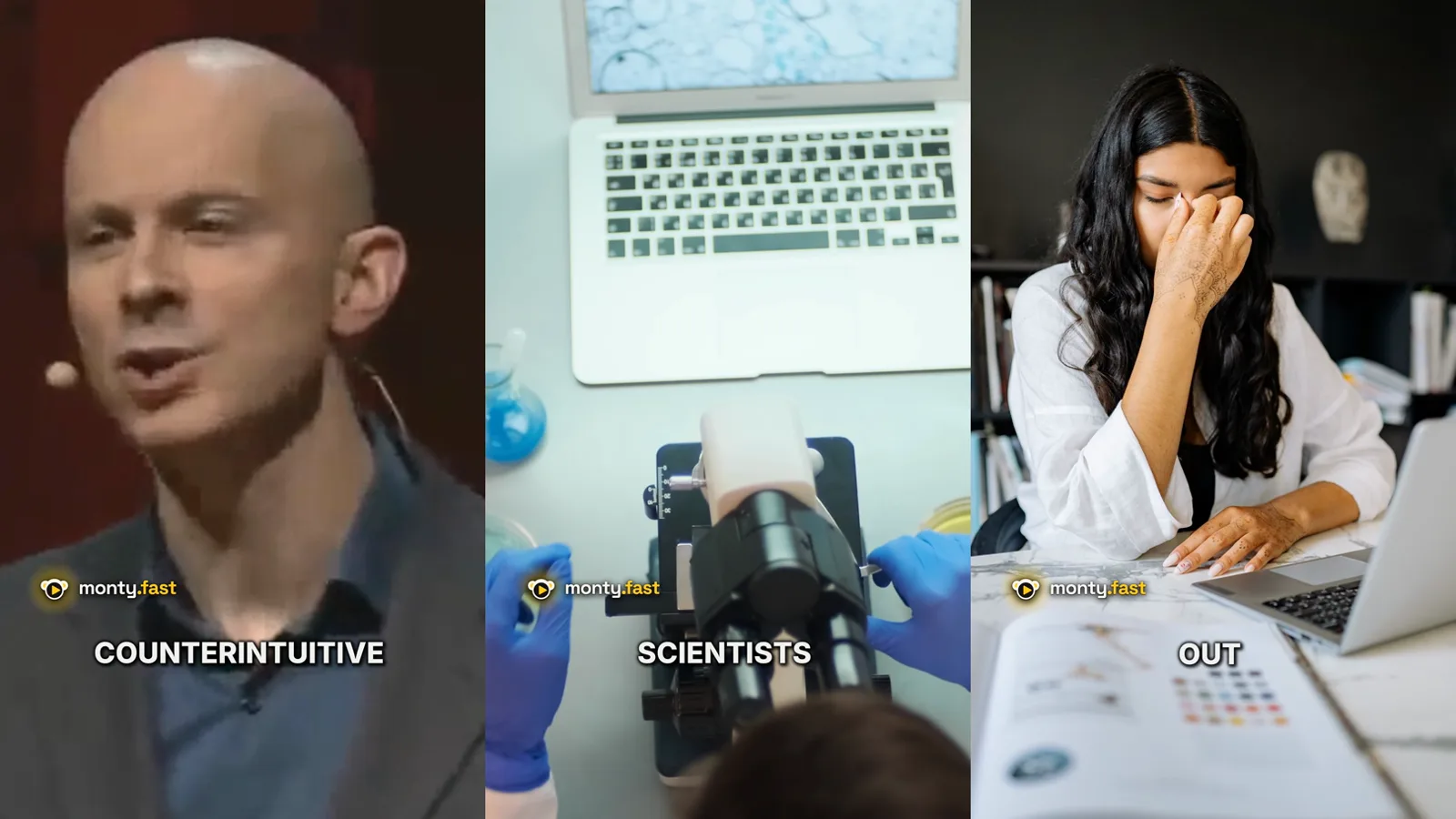
Captions. Word-by-word white capitals, synced to the voice. The English transcript of a real speaker was exact (“counterintuitive”, “slow motion multitasking”), and the French transcripts were correct with accents and apostrophes.
Hooks. Monty adds a large generated headline at the top of the frame. It is not a transcript, and it needs a read: one French hook was fine, another promised something nobody says in the video, and on the English speaker the hook was ungrammatical (“What if many things slowly was brilliant”). You can edit it before the final render.
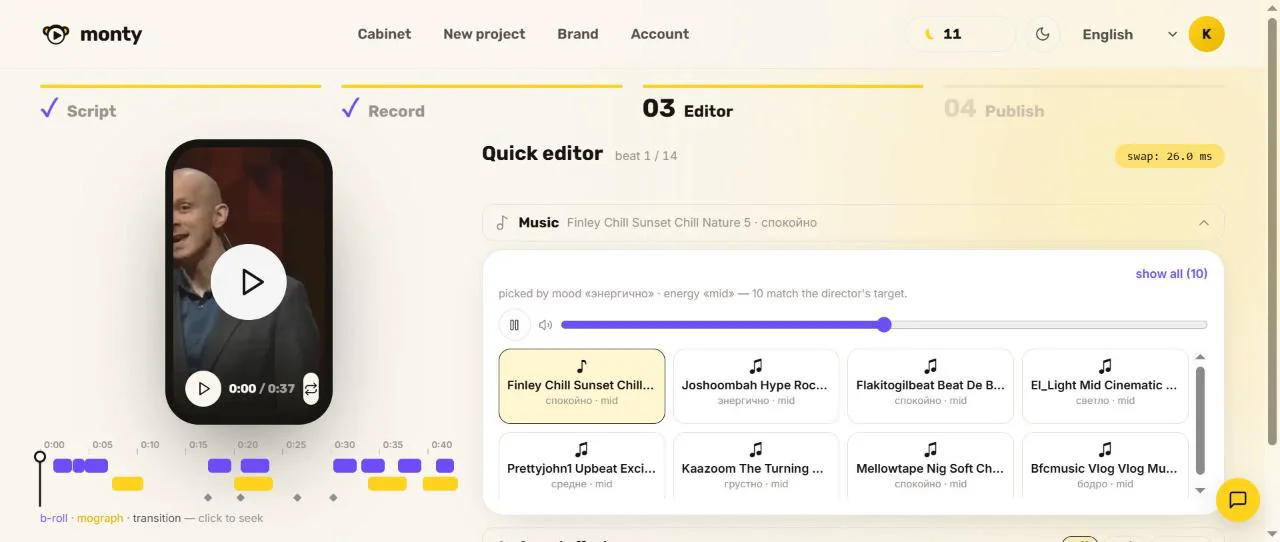
Music and b-roll. Music is picked by mood from a library of ten tracks per beat, with a volume slider (the mood labels are in Russian even though the interface is in English). The automatic pick changed from run to run, so treat it as a suggestion. The illustrative shots are stock photos and clips chosen from the spoken word, such as a microscope for “scientists”, plus animated infographics and statements. Mostly relevant, sometimes literal.
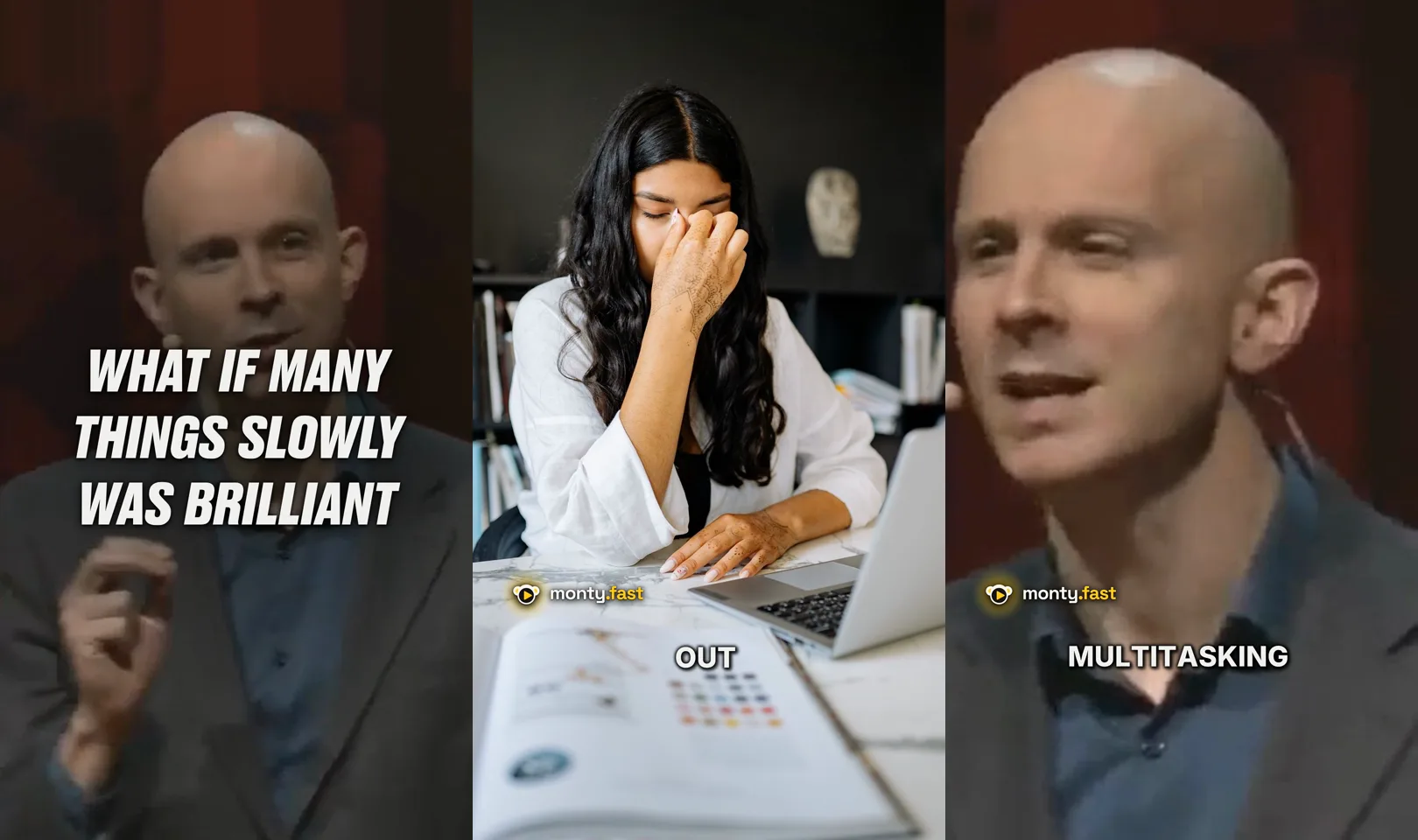
Here is the English render as Monty delivered it, recompressed for the web. The watermark is the free plan’s.
Export, watermark and the publishing texts
The export is an H.264 MP4 at 1080 x 1920 and 30 fps, around 7 to 8 Mb/s, with stereo AAC audio at about 200 kb/s. That is 23 to 33 MB for 25 to 38 seconds. There is one resolution and one master per project, not a separate file per network.
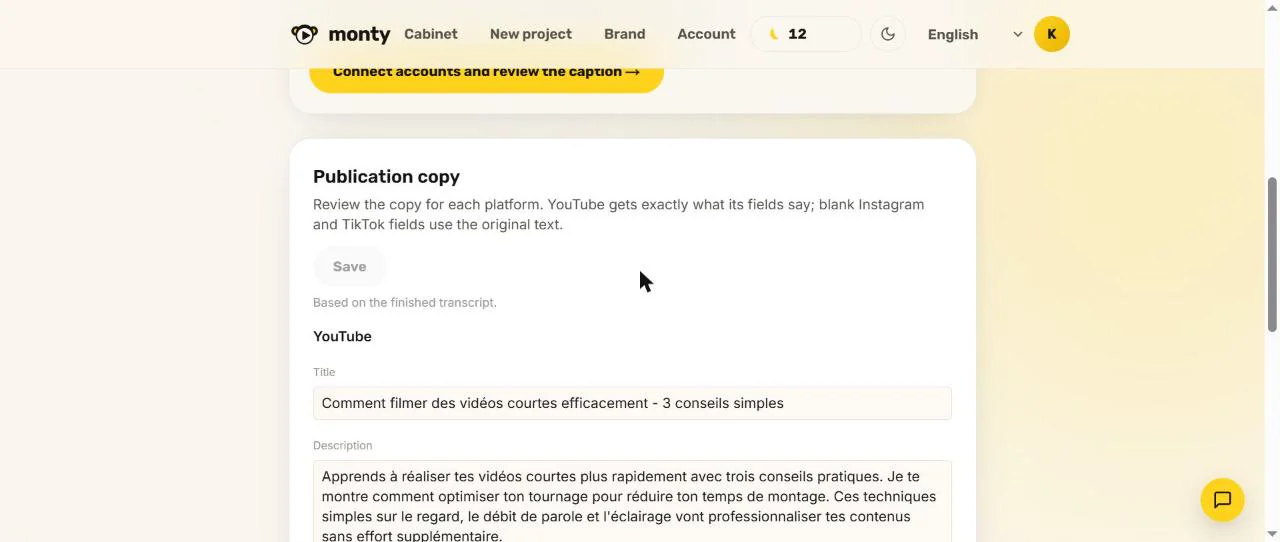
On the free plan a “monty.fast” watermark sits at the bottom left for the whole video except the first frame. It goes away from the Creator plan. What Monty does prepare per platform is text: a YouTube title, description and tags, an Instagram caption and a TikTok title, generated in the language of the take.
Does Monty have a built-in voice?
No, and it is worth knowing before you sign up. Monty has no text-to-speech, no avatars and no voiceover generator. It edits your recording. If you start from the script option, it writes the text and then gives you a teleprompter so that you record it yourself in the browser. When we wanted a French take with a clean voice for our own tests, we had to produce the audio outside Monty and upload it as a file.
If you are looking for a tool that generates the video and voice for you, that is a different category: see our Deevid AI review for generated footage, or our NimbleVid review for a long-form faceless pipeline.
What went wrong
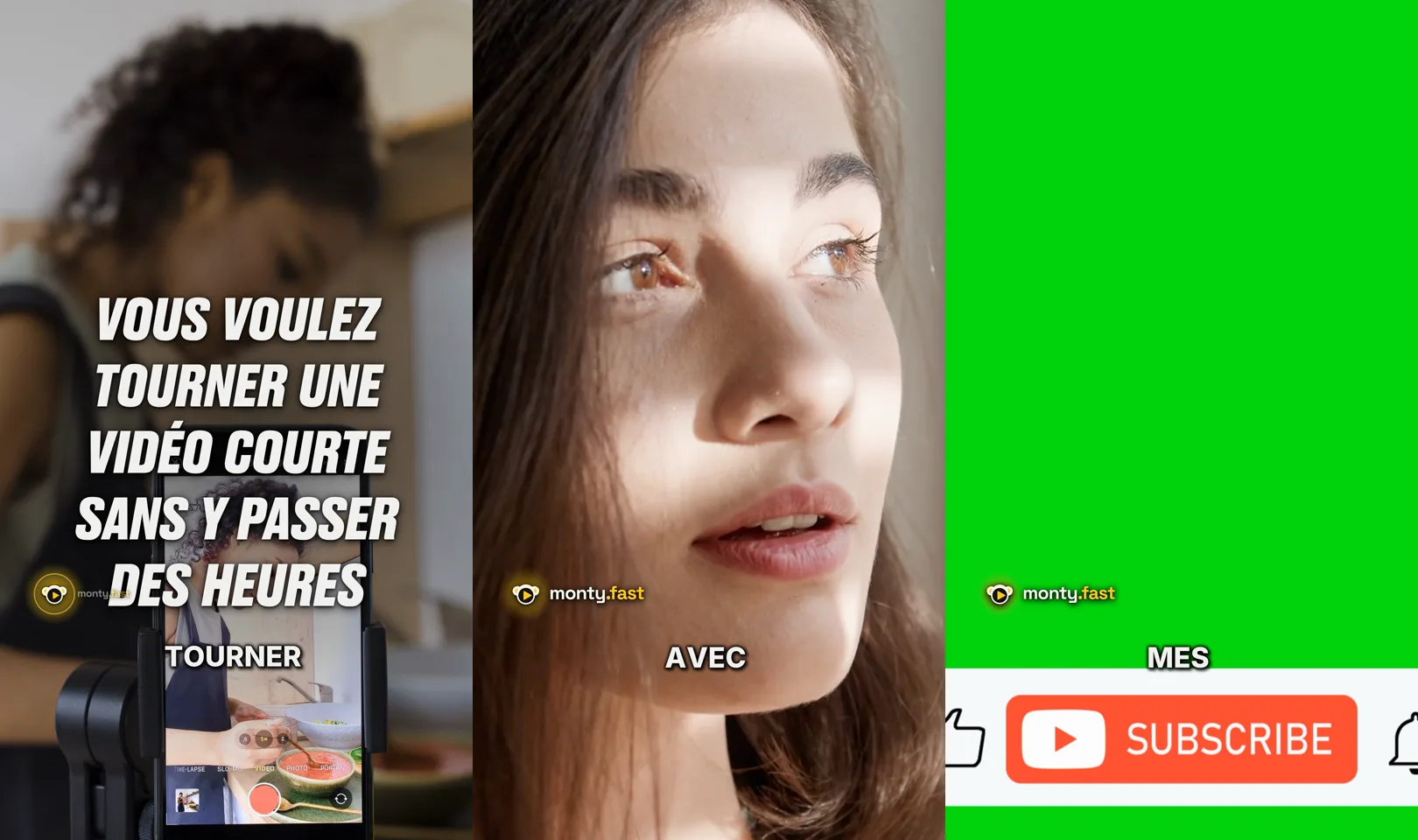
A green shot in 2 of 3 French renders. In runs 1 and 5, a full-screen bright green background with a “Subscribe” animation replaced the footage for about two seconds, right on the French word for “subscribe”. It was not visible in the preview, only in the final master. It did not appear in the English render or in run 6, whose script avoided that word, so it may be tied to the phrase. Either way: watch the full export before you post.
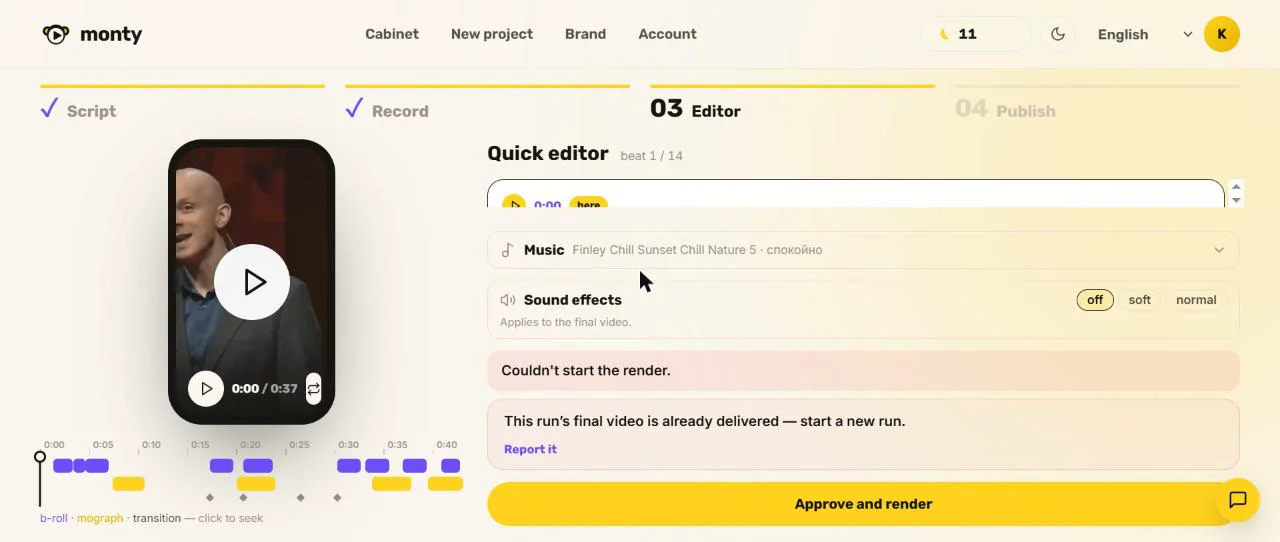
Re-renders are not free after delivery. You can change music, sound effects, captions and scene types in the preview at no cost. Once the master is delivered, a second final render of the same run is refused with “start a new run”, which costs another credit. Fix everything in the preview before you click “Approve and render”.
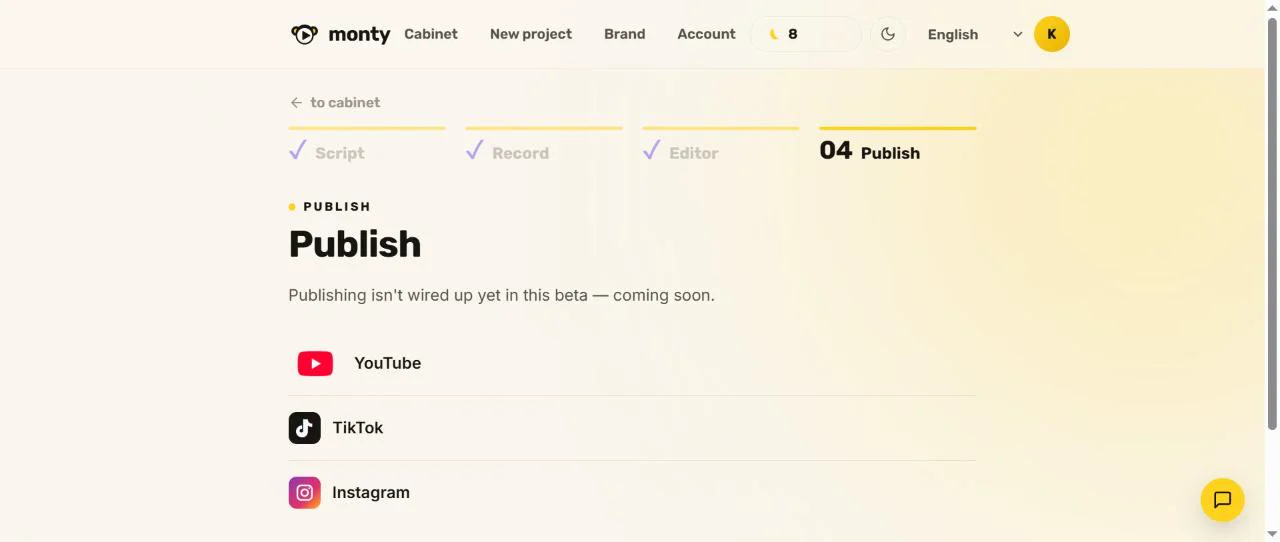
Publishing is not wired yet. The homepage talks about publishing to your channels, but the Publish page of our beta account says publishing is not wired in this beta. You download the MP4 and post it yourself.
Smaller issues. The preview page sometimes froze for a while while it preloaded b-roll in Chrome, a click on “Start montage” occasionally needed a second try, and a 16:9 source at 720p is cropped tightly and enlarged, so some close-ups look soft. We could not confirm the 3-minute free limit: a 3 min 45 file was accepted, but Monty kept only a 31-second plan from our looped take.
Monty pricing
Official grid read on October 25, 2026, in US dollars. The publisher states you can cancel at any time, no card is needed to start, and paid plans are refundable within 14 days.
| Plan | Monthly | Yearly | Videos per month | Max length | Notes |
|---|---|---|---|---|---|
| Free | $0 | n/a | 3 | 3 min | 1 channel, watermark, no Brand Brain |
| Creator | $29 | $290 ($24/mo) | 15 | 3 min | No watermark, scheduler, 2 channels, 1 Brand Brain |
| Pro | $49 | $490 ($41/mo) | 30 | 5 min | All channels, publish everywhere, priority rendering |
| Studio | $149 | $1,490 ($124/mo) | 100 | 5 min | API access, white-label output, team access, 5 Brand Brains |
For anyone publishing without a watermark, Creator at $29 is the realistic entry point. Brand Brain (script in your own style), translation and the paid plans were not part of our test.
Promo code BEKOE: 30% off the first payment. According to the partner terms we read on October 25, 2026, the code applies once, to the first payment. Start on the free plan, test your own take, then enter BEKOE at checkout and check the discount shown.
Monty vs Submagic, Opus Clip, Revid and Vizard
These tools often show up in the same searches, but they start from different inputs.
- Monty starts from your own short takes and edits them end to end. It does not cut long videos.
- Submagic dresses a video you already shot with animated captions and b-roll.
- Opus Clip and Vizard start from a long video, such as a podcast, and find the clips worth posting.
- Revid generates videos from ideas, scripts and links. See our three-way Revid vs Opus Clip vs Submagic comparison, and browse every tool in our alternatives hub.
If your problem is that you film a take every week and give up at the editing stage, Monty is aimed at exactly that. If you want to chop up a one-hour podcast, it is the wrong tool.
Is Monty worth it? Our verdict
3.5 out of 5. What we would keep: the cutting of pauses and flubs, accurate captions, the 8 to 12 minute turnaround and the ready-to-paste publishing texts. What to plan for: watch the whole master before posting (green shot, generated hook), fix everything in the preview because a new render costs a credit, and download and post the file yourself because publishing is not wired yet. We will revisit the score when publishing ships.
Our recommendation: use the free plan with your own take first, and move to Creator, with the code BEKOE, if the result suits you.
Test Monty on your next take. Free plan with no card, then Creator from $29/month, with 30% off the first payment using BEKOE.
You can read how we run and score our tests on our methodology page.
FAQ
Is Monty free?
There is a free plan: 3 videos per month, up to 3 minutes each, one channel, with a monty.fast watermark that we saw on the whole export. Paid plans start at $29/month for Creator ($24/month billed yearly), then $49 for Pro and $149 for Studio. Prices checked October 25, 2026, and the tool is still in beta.
Does Monty generate AI voices or avatars?
No. Monty edits footage you provide: you upload a recording, or you let it write a script and record yourself with its in-browser teleprompter. There is no text-to-speech, no avatar and no voiceover generator in the app. If you need synthetic voices or generated footage, you need another tool first.
How long does Monty take to edit a video?
On our 47 to 52-second files, 8 to 12 minutes from upload to a downloadable master: about 4 to 8 minutes for the plan and preview, then 3 minutes 30 to 4 minutes 40 for the final render. The publisher advertises about four minutes on its homepage.
Does Monty remove pauses and mistakes?
Yes, and this is its strongest feature. A 47-second take with three planted blanks (2.5, 1.8 and 3 seconds), an 'um' and a flubbed sentence came out at 24.7 seconds with no silence longer than 0.3 seconds. A second take of 52.5 seconds came out at 27.5 seconds.
Does Monty post to TikTok, Reels and Shorts for me?
Not yet. In our beta account the Publish page says publishing is not wired in this beta. You download the MP4 and post it yourself. Monty does write the title, description, tags and caption for each platform.
Can I re-render a video for free?
You can change music, sound effects, subtitles and scene types in the preview at no cost before the render. Once the final video is delivered, a second final render of the same run is refused and you have to start a new run, which costs one credit.
Does Monty work in other languages?
The interface is English, Russian, Korean, Chinese and Spanish. French is not listed on the website, but captions and publishing texts came out correct in our French tests, accents included. Check your own language on the free plan before paying.
What is the Monty promo code?
The code BEKOE is entered at checkout. According to the partner program terms we read on October 25, 2026, it gives a one-time 30% discount on the first payment. Use our link, then check the discount shown before you confirm.