Short answer: the best Revid AI alternative depends on which of its jobs you actually need. Opus Clip is better for clipping long videos, Submagic for captions on your own footage, NimbleVid for 10-minute faceless YouTube videos, InVideo AI for prompt-to-video with stock footage, CapCut for free manual editing, and Creatify for product ads. Crayo is the closest like-for-like for faceless clip channels. Revid stays the reference when you want one subscription that goes from viral research to script, visuals, voice and publishing. Prices below were read on October 24, 2026.
Prices read on the official pages on October 24, 2026; NimbleVid and Revid’s free script generators tested hands-on. Links to Revid, Submagic, NimbleVid, InVideo AI and Creatify are affiliate links (disclosure).
Want the all-in-one pipeline? Revid starts at $39 a month and its script generators work with no account. New subscribers get 20% off the first month with code BEKOE.
Revid AI alternatives at a glance
| Tool | Best for | Entry price (Oct 24, 2026) | Free way in |
|---|---|---|---|
| Revid | Script, visuals, voice and publishing in one tool | $39/mo (Growth, 2,000 credits) | Free script and hook tools, starter credits |
| Opus Clip | Clipping long videos | $15/mo (Starter) | Free plan |
| Submagic | Captions and polish on your footage | $19/mo, or $12/mo billed yearly | “No credit card required” start |
| CapCut | Manual editing with AI add-ons | $19.99/mo (Pro) | Free plan |
| NimbleVid | Long-form faceless YouTube | $49/mo (Entry) | Trial credits, 7 days, select regions |
| InVideo AI | Prompt to video with stock and generated clips | $10/seat/mo billed annually | Not seen on the page we read |
| Crayo | Faceless and clip channels | $13/mo billed yearly at $160 | None listed |
| Creatify | URL to UGC-style ads | $39/mo (Platform, Starter) | See its pricing tabs |
What should a Revid AI alternative do?
Revid is easy to misjudge, because it is not one tool. Based on its documentation and public pages it does five things inside one credit system: it finds videos audiences already watch (a library of roughly 2.77 million short videos, according to Revid), writes a new script, generates visuals and a voice, adds captions and music, and publishes to TikTok, Instagram and YouTube. It also has an API, an MCP server and Auto-Mode workers that generate one video a day.
So when someone asks for an alternative, they usually mean one of three things:
- “I do not want to generate anything, I want to cut my long videos.” You need a clipper.
- “I already film, I just want captions and polish.” You need a caption layer.
- “I want the whole pipeline from another vendor.” You need a script-to-video generator.
We grouped the seven tools by those jobs. For a deeper look at Revid itself, read our Revid AI review, and for what you can use without paying, our guide to Revid AI free.
Opus Clip: the clipper for long videos
Opus Clip takes a long recording, such as a podcast, webinar or YouTube video, finds the segments most likely to work as short clips, reframes them and adds animated captions. It processes your existing footage, so it does not write scripts or generate visuals the way Revid does.
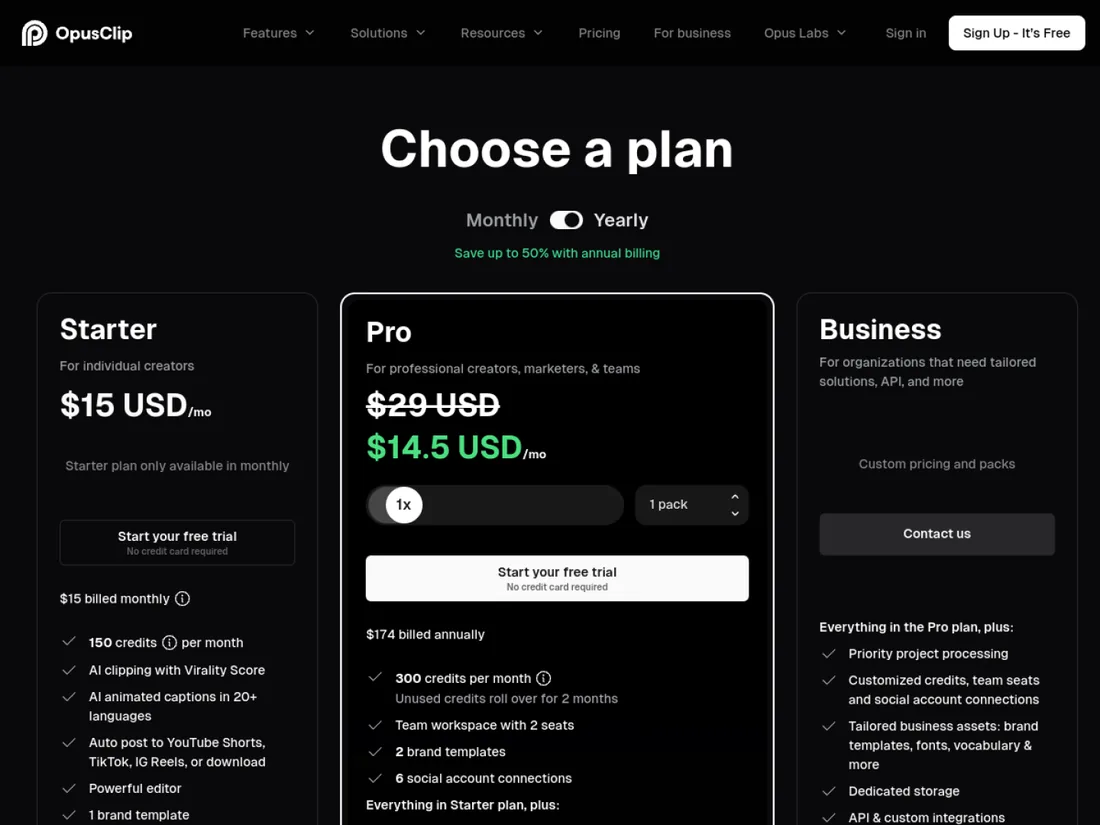
Price today: a free plan exists; Starter is $15 a month (monthly billing only, 150 credits); Pro is $29 a month, or $14.50 a month billed annually at $174, with 300 credits a month that roll over for two months and a workspace for two seats. Business is custom.
Choose it over Revid when: your raw material is a long recording and you want 5 to 15 clips from it. Stay with Revid when: you need to create footage you did not shoot. Revid does have a long-video-to-shorts tool (its documentation lists a 10-credit reframe step), but clipping is Opus Clip’s whole product. Our Opus Clip review covers the credit system, and our Vizard review compares a close rival.
Official site: Opus Clip.
Submagic: the caption and polish layer
Submagic starts after filming. You upload a video and it adds animated captions, B-roll, hook titles, zooms, and removes silences and bad takes. It does not generate a video from a script.
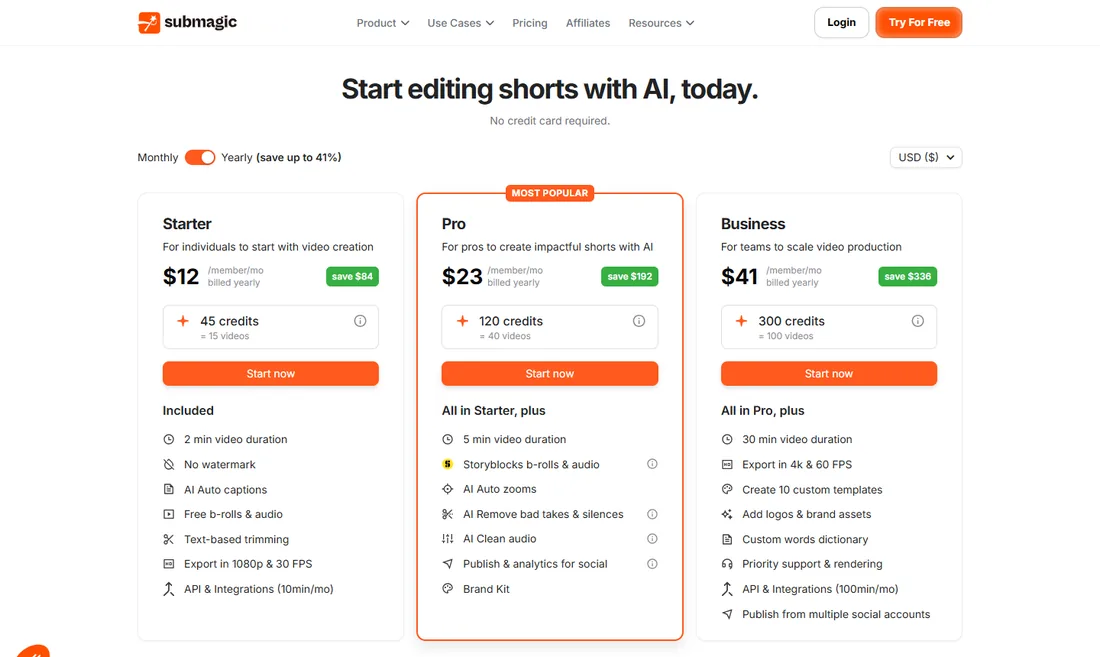
Price today: Starter is $19 a month or $12 a month billed yearly (45 credits, about 15 videos, 2-minute videos, 1080p at 30 fps, no watermark). Pro is $39 or $23 (120 credits, about 40 videos, 5-minute videos). Business is $69 or $41 (300 credits, about 100 videos, 30-minute videos, 4K at 60 fps). The page says no credit card is required.
Choose it over Revid when: you film yourself or have a voiceover and need captions that look current. Stay with Revid when: you have no footage. Revid has its own caption presets, 16 of them including Hormozi and Beat, and a tool that adds captions to existing video in 100+ languages, so a stack is not always necessary. Read the Submagic review for the full picture.
Official site: Submagic.
CapCut: the free editor with AI features
CapCut is a general video editor with templates, captions and a growing set of AI generation features, so it overlaps with Revid at the edges only. You edit by hand, which is slower than Revid’s one-click pipeline but gives more control.
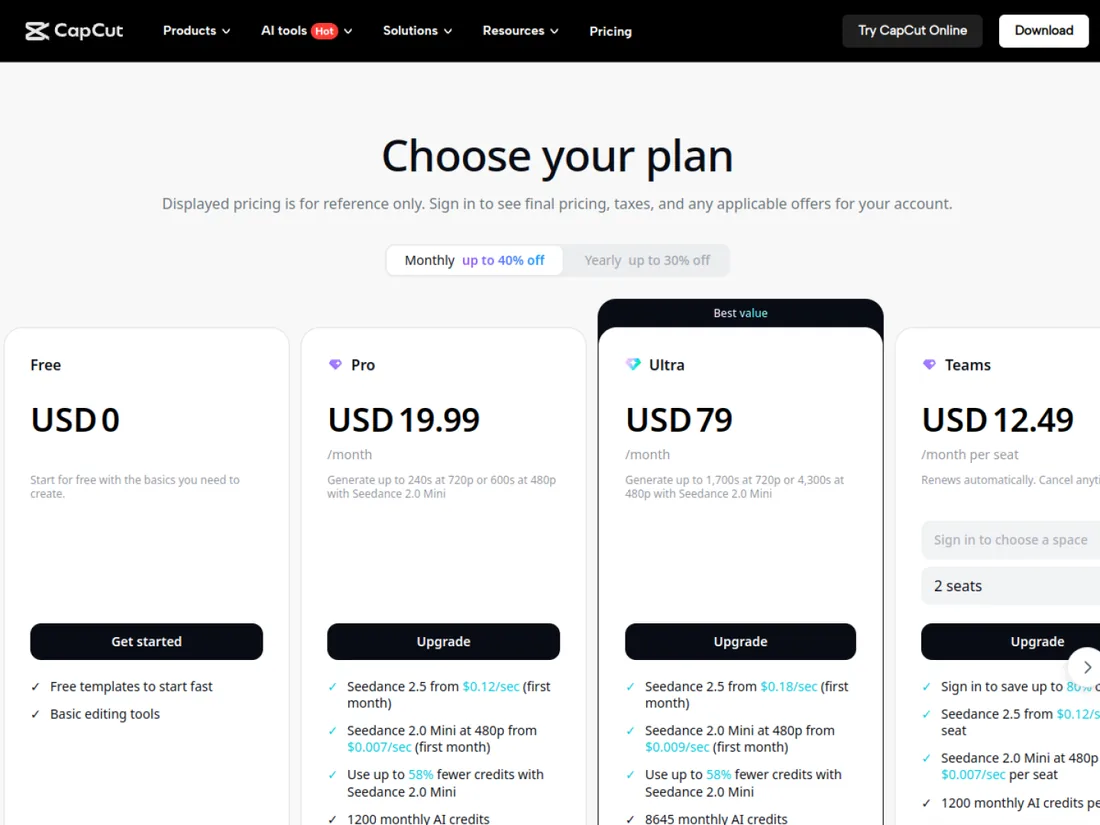
Price today: Free at $0 with free templates and basic editing; Pro at $19.99 a month; Ultra at $79 a month; Teams at $12.49 a month per seat for two seats. Paid plans include monthly AI credits for generation, with model-specific per-second prices shown on the page.
Choose it over Revid when: your budget is zero or you prefer manual control. Stay with Revid when: the time you spend assembling a video is the real cost. Revid’s own documentation recommends a classic editor such as CapCut for people who only want to edit their own footage by hand.
Official site: CapCut.
NimbleVid: the long-form faceless YouTube pipeline
NimbleVid is the alternative we know best. In our test it produced a 9-minute 05-second faceless video in 1080p, with no watermark, for 1,089 credits, in about 35 minutes from title to download. It generates one image per scene in a consistent style, adds an ElevenLabs narration, camera motion and subtitles, and writes the thumbnail and description.
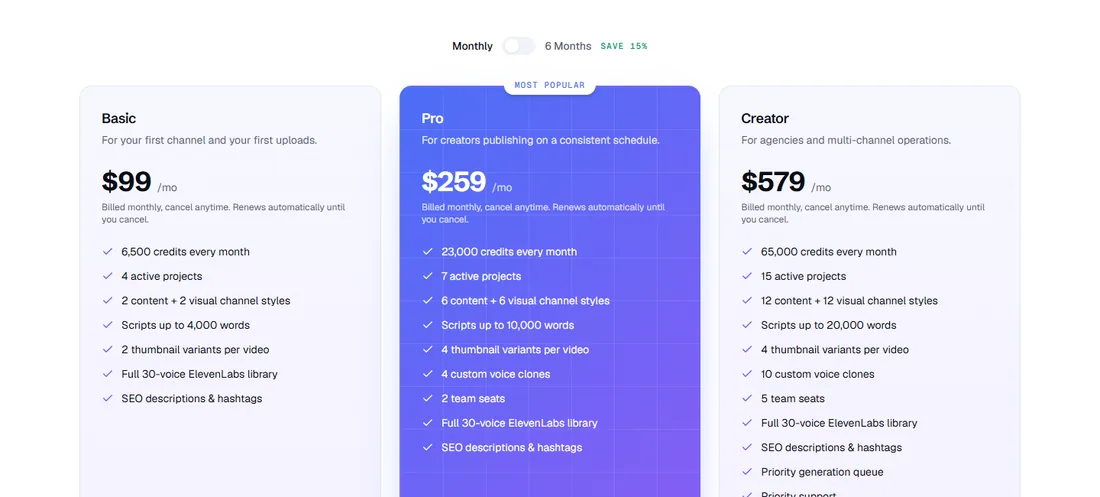
Price today: Entry is $49 a month for 2,850 credits; Basic is $99 (6,500 credits); Pro is $259 (23,000); Creator is $579 (65,000). A six-month billing option saves 15%. New accounts in selected regions get free credits valid for 7 days.
Choose it over Revid when: your channel is a 10-minute explainer or history format. Stay with Revid when: you publish Shorts and TikToks daily. The honest weakness we found is on-image text that can be invented, so every scene needs a human check. Full details are in our NimbleVid review.
Official site: NimbleVid.
InVideo AI: prompt to video with stock and generated clips
InVideo AI is the nearest competitor to the “type an idea, get a video” side of Revid. You describe a video, the AI writes and assembles it with stock footage and generated clips, and you edit it in a timeline editor.
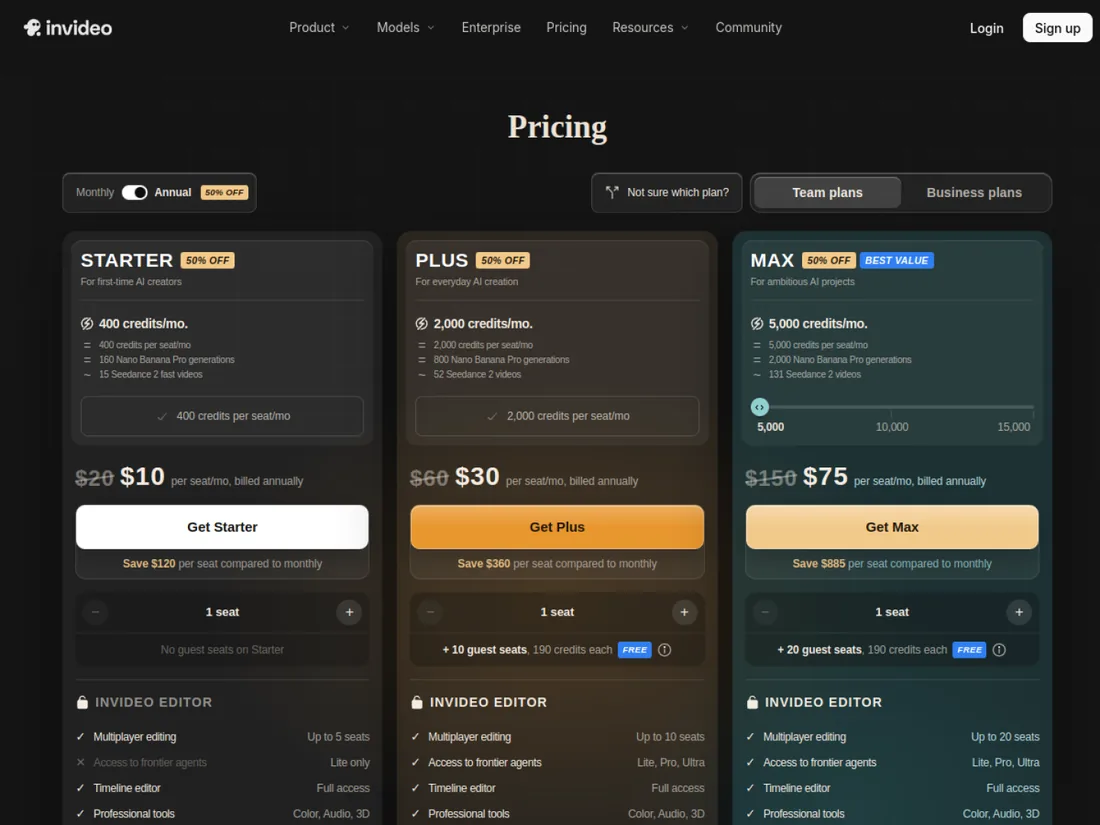
Price today: the page shows, with the annual toggle on and a 50% off label, Starter at $10 a seat per month billed annually (list price $20), Plus at $30 ($60), and Max at $75 ($150), with 400, 2,000 and 5,000 credits per seat per month. Plus and Max include extra seats and guest seats.
Older figures you may see elsewhere, such as a flat $28 a month, no longer match this page. Choose it over Revid when: you want a seat-based team plan and a familiar editor. Stay with Revid when: you want the viral-reference library, Auto-Mode or an API in the base plan. See our Deevid AI vs InVideo comparison for the generator side.
Official site: InVideo AI.
Crayo: the faceless and clip channel tool
Crayo describes itself as a web video editor for short-form clipping. You upload a file or paste a YouTube or TikTok link, pick a subtitle style and it builds a video. It also has AI voiceovers, AI images, Reddit-story videos and tools for faceless and brainrot channels.
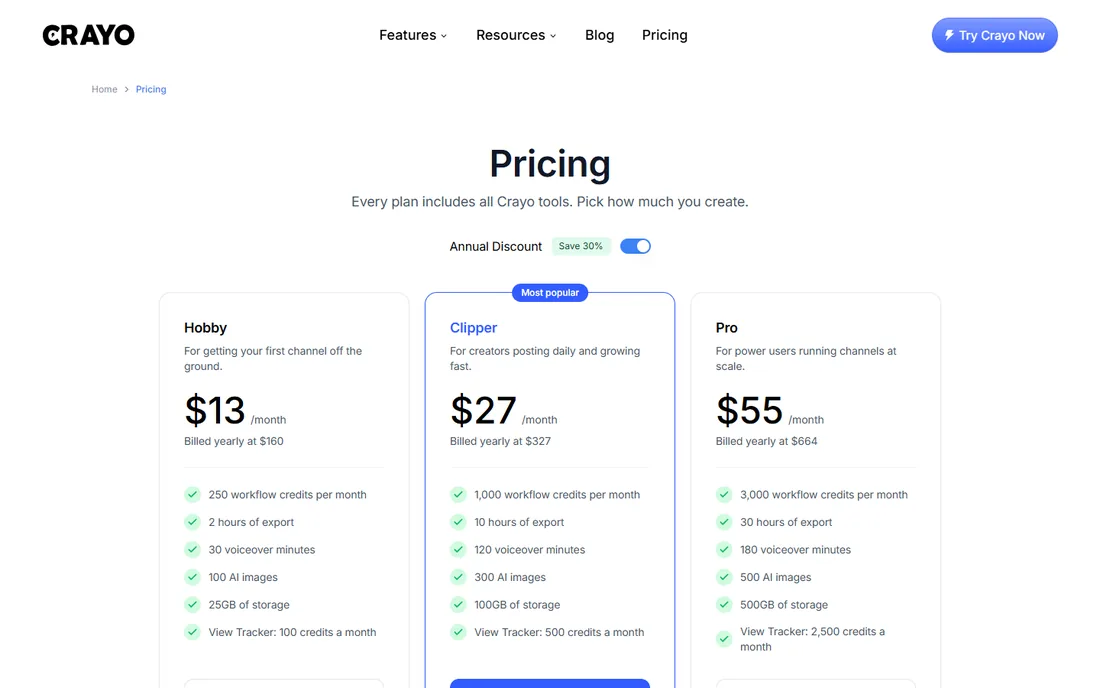
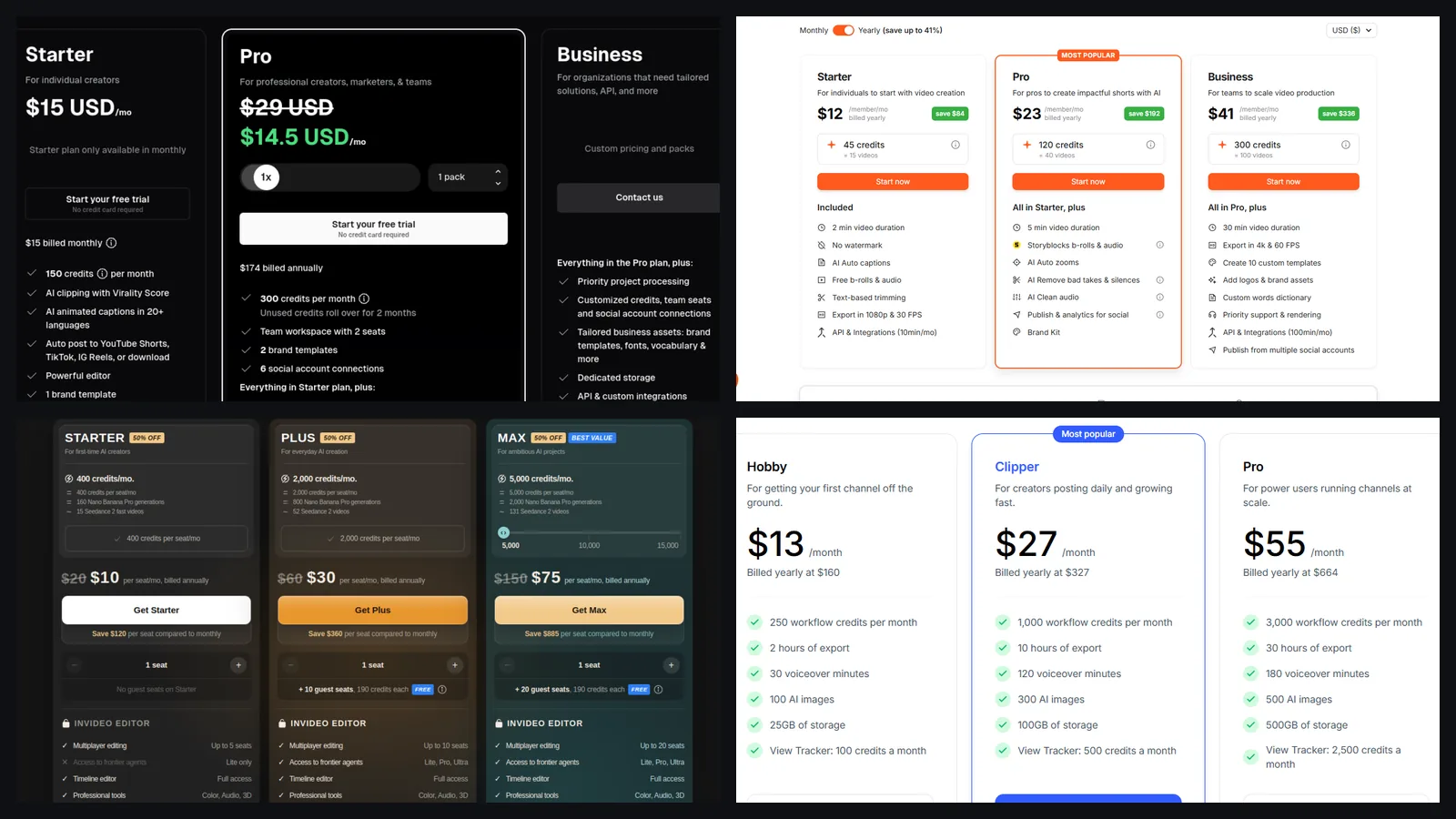
Price today: Hobby is $13 a month billed yearly at $160 (250 workflow credits), Clipper is $27 billed yearly at $327 (1,000 credits) and Pro is $55 billed yearly at $664 (3,000 credits). The page lists export hours, voiceover minutes and AI images per plan, shows no free plan, and says refunds are not offered. Its annual totals are slightly higher than twelve times the monthly figures, so check the final amount at checkout.
Choose it over Revid when: your formats are clip-driven or brainrot. Stay with Revid when: you want research, direct publishing and automation under one credit system. Crayo is covered from its public pricing page only.
Official site: Crayo.
Creatify: URL to UGC-style product ads
Creatify turns a product link into short ad videos with AI avatars and voice. That overlaps with Revid’s UGC ad generator, where the page we captured estimated 341 credits before any prompt was typed.

Price today: the Platform tab showed Starter at $39 a month with 100 credits per month, with a toggle for up to 50% off on annual plans. The page also has Studio and API tabs with other prices, so verify the tab that matches your use. Choose it over Revid when: ads for products are your main output. Stay with Revid when: you also need organic short-form content. Our Creatify review, Arcads review and TopView AI review compare the ad tools in more depth, and the AI UGC tools roundup lays out the whole category.
Official site: Creatify.
Free alternatives to Revid AI
Three rows of the table above have a free way in. CapCut’s free plan gives free templates and basic editing. Opus Clip’s free plan covers clipping with watermarked animated caption templates. Submagic’s page says no credit card is required to start. Revid itself also has free tools that need no account: script generators for TikTok and YouTube Shorts, a hooks library, a video-to-prompt tool and a TikTok audit. We detail them in our Revid AI free guide.
The trade-off is plain. Free plans cap output, add watermarks or limit exports, and none of them replaces a paid pipeline if you publish daily.
When Revid AI is still the better choice
Revid is the stronger pick when you check these boxes:
- You publish short-form video at least weekly and do not film.
- You want to start from formats that already performed, then write an original script.
- You value one subscription for research, creation and publishing, including Auto-Mode workers and an API.
- You accept credit-based pricing and can control cost with the estimate shown next to the Generate button.
Revid’s honest limits: it is short-form first, credits do not roll over, and, its free script generator invents anecdotes you must remove, and the video output is worth checking on a first render. See the Revid AI review for the full test notes and a pricing table.
How to choose between these tools
- Write down your weekly output. Ten Shorts, one long video, or twenty clips from a podcast?
- Name the raw material. Nothing, a recording, or a product link?
- Pick by job first, price second. A $15 clipper beats a $39 generator if all you have is a podcast.
- Convert to cost per finished video. Revid’s estimated 40 to 80 credits for a 30-second video is about 80 cents to $1.60 at Growth’s monthly price, by our arithmetic.
- Test free first. Run the free tier, read the export, and only then subscribe.
Not sure Revid fits your job? Run its free script generator on your real niche before you pay, and compare the estimated cost of one video. New subscribers: code BEKOE takes 20% off the first month.
FAQ
What is the best alternative to Revid AI?
There is no single best one, because Revid bundles five jobs: finding viral formats, writing scripts, generating visuals and voice, captioning, and publishing. Opus Clip is the best alternative for clipping long videos, Submagic for captions and polish on your own footage, NimbleVid for 10-minute faceless YouTube videos, InVideo AI for prompt-to-video with stock and generated clips, and CapCut for free manual editing.
Is there a free alternative to Revid AI?
Yes, three have a free way in as of October 24, 2026. CapCut has a free plan with free templates and basic editing. Opus Clip has a free plan with watermarked animated caption templates. Submagic says no credit card is required to start. None of them rebuilds Revid's script-to-publish pipeline for free, and Revid's own script, hook and analysis tools are free with no account.
Is Revid AI cheaper than Opus Clip, Submagic or InVideo AI?
Not on price alone, and the comparison depends on the job. Revid Growth is $39/month for 2,000 credits. Opus Clip Starter is $15/month and Pro is $29/month or $14.50/month billed yearly. Submagic Starter is $19/month or $12/month billed yearly. InVideo AI shows $10, $30 and $75 per seat per month billed annually. They buy different things, so compare cost per finished video, not the sticker price.
Which Revid AI alternative is best for faceless YouTube videos?
For long-form, NimbleVid, which we tested by making a 9-minute 05-second faceless video for 1,089 credits. Revid is optimized for short-form, though its API can set target durations up to 30 minutes. For faceless Shorts and TikToks, Revid, Crayo and InVideo AI are the closest competitors.
Which alternative is best for UGC-style product ads?
Creatify and Arcads are built for that job, and TopView AI is another option. Revid also has a UGC ad generator and a product-link workflow. Our reviews of Creatify and Arcads compare prices, realism and who each is for.
Can I use Revid AI together with Opus Clip or Submagic?
Yes, and many creators do. A common stack is Opus Clip or Revid's own long-video converter to cut clips, Submagic to polish captions on footage you shot, and Revid to generate the faceless videos you did not film. Each tool charges separately, so check that a stack costs less than one tool doing both jobs adequately.
Do these alternatives have affiliate links on this page?
Some do. Links to Revid, Submagic, NimbleVid, InVideo AI and Creatify are affiliate links, and we earn a commission if you subscribe, at no extra cost to you. Links to Opus Clip, CapCut and Crayo are plain links. Prices come from the official pricing pages on October 24, 2026.